If you run a Magento 2 store and your frontend still loads on Luma's default stack, you are shipping roughly 300KB of JavaScript that most of your customers never need. Hyva theme for Magento 2 replaces that entire frontend layer - " swapping RequireJS and KnockoutJS for Alpine.js and Tailwind CSS - " and the performance difference is not subtle. Stores running Hyva consistently load in under 2 seconds, score 90+ on Lighthouse, and see measurable improvements in conversion rates tied directly to faster page rendering.
This guide covers what Hyva actually is, how it compares to Luma and headless alternatives, what it costs to implement in Australia (in AUD), and where migrations go wrong. It is written for CTOs, technical leads, and agency decision-makers evaluating whether Hyva is worth the investment for a mid-market retail operation.
What Is Hyva Theme? (Now Free and Open Source)
Hyva is a complete frontend replacement for Magento 2. Rather than patching Luma's ageing architecture, Hyva rebuilds the storefront layer from scratch using two modern, lightweight libraries: Alpine.js for interactivity and Tailwind CSS for styling.
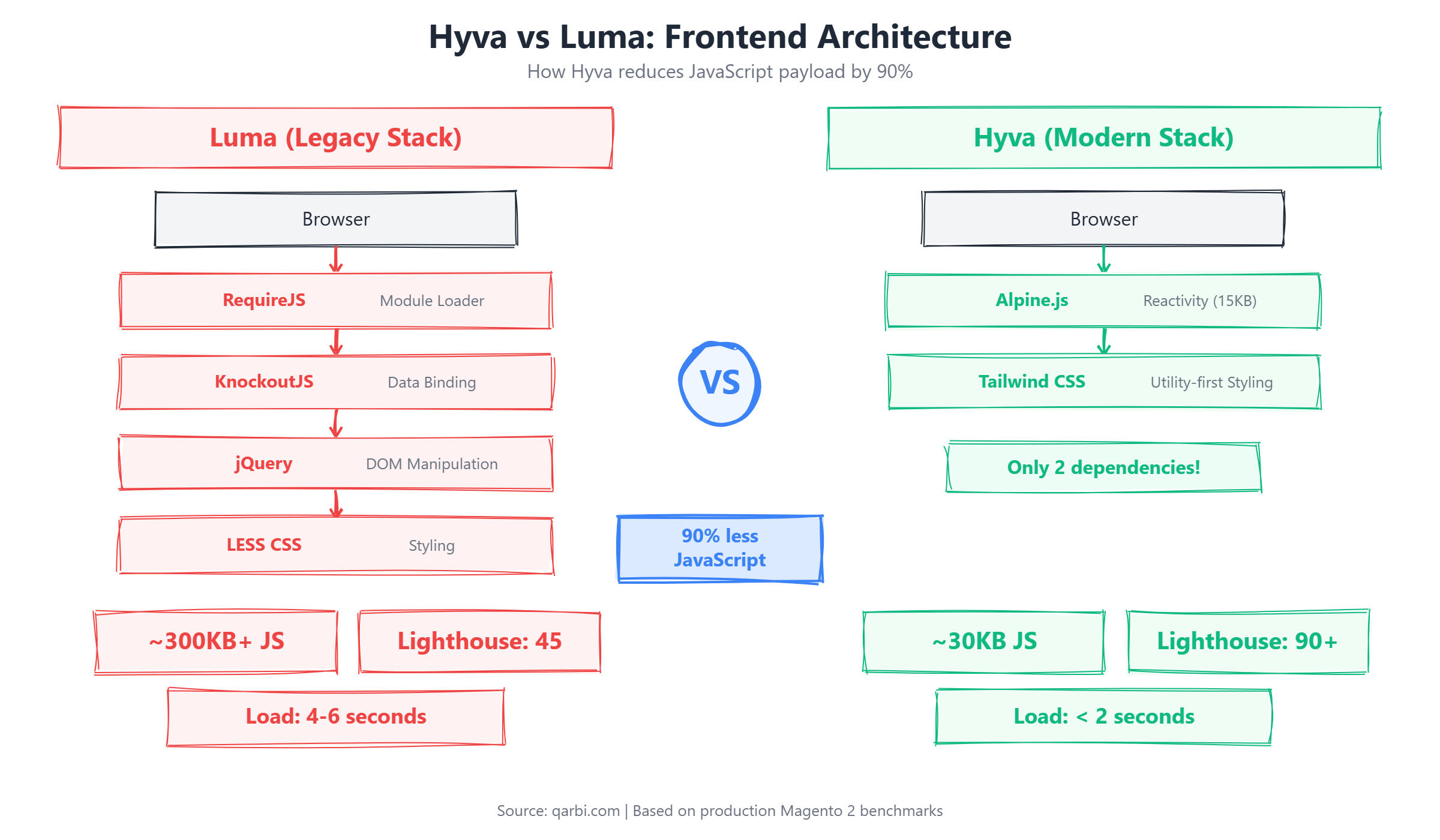
The practical effect is dramatic. Luma loads RequireJS, KnockoutJS, jQuery, and a chain of dependent scripts on every page - " typically 300KB or more of JavaScript before the browser can render meaningful content. Hyva strips that down to roughly 30-50KB. The browser has less to parse, less to execute, and the page becomes interactive significantly faster.
To understand why that reduction is so significant, consider what each library swap actually does at the browser level. Alpine.js replaces KnockoutJS as the reactivity engine - " the layer responsible for updating the DOM when a customer interacts with the page (adding to cart, filtering products, toggling menus). Alpine.js weighs roughly 15KB minified compared to KnockoutJS at 90KB or more, yet handles the same declarative binding patterns with simpler syntax. On the styling side, Tailwind CSS replaces Luma's LESS-based compiled stylesheets with a utility-first approach. Instead of generating large CSS bundles where most rules go unused on any given page, Tailwind produces only the CSS classes actually referenced in your templates. The result is a styling payload that is typically 10-20KB after purging, compared to 150KB or more from Luma's compiled LESS output. Together, these two swaps eliminate the primary bottleneck in Magento frontend rendering: the browser no longer waits for hundreds of kilobytes of JavaScript and CSS to download, parse, and execute before it can paint meaningful content on screen.
Hyva was created by Willem Wigman, a veteran Magento developer based in the Netherlands, and first launched in 2021. For its first three years, Hyva operated as a commercial product with a licence fee of approximately EUR 1,000 per year per production store. Despite the cost, adoption grew steadily because the performance gains were undeniable. In late 2024, Wigman made the decision to open-source Hyva under the MIT licence, removing the cost barrier entirely. This move accelerated adoption dramatically - " the community grew from roughly 2,000 live stores at the time of the open-source announcement to over 4,900 live stores by early 2026. The open-source transition also expanded the contributor base, with agencies and developers worldwide now submitting compatibility modules, bug fixes, and feature enhancements directly to the project.
Originally launched as a commercial product with a licence fee of approximately EUR 1,000 per year, Hyva transitioned to a free, open-source model under the MIT licence in 2024. This removed the primary cost barrier and accelerated adoption. As of early 2026, over 4,900 live stores run Hyva in production across a range of industries and markets.
For Magento agencies and in-house teams, Hyva also changes the developer experience. Tailwind's utility-first approach and Alpine's declarative syntax mean frontend developers no longer need deep expertise in Magento's legacy XML layout system and KnockoutJS templating. Teams can build and iterate on storefront components faster, which reduces both initial build time and ongoing maintenance cost.
Hyva vs Luma: Real Performance Benchmarks
Marketing claims are easy. Here are the numbers that matter, measured across real production stores using Google Lighthouse (mobile, 4G throttling) and WebPageTest.
These are not best-case lab numbers. They reflect what we see on typical mid-market retail stores with 5,000-50,000 SKUs, running standard hosting configurations. Stores with well-optimised images and CDN configurations on Hyva regularly hit Lighthouse scores of 95+.
Understanding why Hyva is faster requires looking at what the browser actually does when it loads a Luma page. Luma's RequireJS module loader works by asynchronously fetching JavaScript modules, but those modules have their own dependencies, which have their own dependencies - " creating a cascading chain of network requests and script evaluations that block rendering. KnockoutJS then adds another abstraction layer on top, binding data to DOM elements through a virtual DOM diffing process that is computationally expensive on mobile devices. jQuery, still loaded on every Luma page, adds yet another layer of DOM manipulation overhead. Hyva eliminates all three of these layers in a single architectural change. Alpine.js handles reactivity with a fraction of the code, operating directly on the DOM without a virtual DOM layer. The result is that the browser's main thread - " the single thread responsible for both JavaScript execution and visual rendering - " is freed up dramatically, allowing the page to paint and become interactive far sooner.
The performance difference maps directly to Google's Core Web Vitals, the metrics that affect both search rankings and real user experience. Largest Contentful Paint (LCP) improves because less JavaScript means the browser can render the largest visible element - " typically a hero image or product image - " without waiting for script execution to complete. Cumulative Layout Shift (CLS) improves because Hyva's Tailwind utility classes define explicit width, height, and layout dimensions in the HTML itself, preventing the visual jumps that occur when Luma's dynamically loaded scripts reflow the page. Interaction to Next Paint (INP), the newest Core Web Vital that replaced First Input Delay in 2024, improves because Alpine.js event handlers are lightweight and execute quickly compared to KnockoutJS bindings, which must traverse the entire binding context before responding to a user interaction.
These technical improvements translate directly to revenue. Research from Google and Deloitte has consistently shown that each additional second of page load time reduces mobile conversion rates by approximately 7%. For an ecommerce store processing $500,000 AUD per month in online revenue, improving load time from 4 seconds to 2 seconds represents a potential $70,000 to $100,000 AUD per year in additional revenue from the same traffic volume. That figure does not account for the indirect benefits of improved organic search rankings from better Core Web Vitals scores, which bring additional traffic that also converts at a higher rate.
The performance gap has direct revenue implications. Google's own research shows that each additional second of load time reduces mobile conversions by up to 20%. For a store doing $2M AUD in annual online revenue, cutting load time from 5 seconds to 1.5 seconds is not a technical nicety - " it is a measurable financial improvement that compounds over every visitor session.
Key insight: The biggest performance gain from Hyva is not raw speed - " it is the elimination of render-blocking JavaScript. Luma's RequireJS dependency chain means the browser cannot render the page until it has downloaded, parsed, and executed a cascade of scripts. Hyva removes this bottleneck entirely.
Real-World Hyva Performance Data
Benchmarks in controlled environments tell one story. Production stores with real product catalogs, third-party integrations, and actual traffic patterns tell another. Here is what we see across production Hyva implementations.
The performance improvement scales with store complexity. The more bloated your current Luma implementation, the bigger the Hyva improvement.
What affects real-world results? Catalog size has minimal impact on frontend performance because Hyva's advantage is entirely on the frontend - " the browser rendering layer - " not the backend. A store with 2,500 SKUs and a store with 25,000 SKUs both benefit from the same JavaScript payload reduction. What does affect results is the number of third-party scripts loaded on the page: analytics tags, live chat widgets, A/B testing tools, and marketing pixels all add JavaScript that Hyva cannot eliminate. Custom checkout complexity also plays a role - " stores with multi-step checkouts, address validation, and real-time shipping calculators introduce additional scripts that must be Hyva-compatible. Finally, server-side caching configuration matters. Hyva delivers the frontend fast, but if your Varnish and Redis caching layers are misconfigured, the backend response time will bottleneck the overall experience. The best Hyva implementations pair the frontend migration with a server-side caching audit to capture the full performance potential.
How Much Does a Hyva Implementation Cost in Australia?
With the Hyva licence now free, implementation cost is entirely labour - " design, development, testing, and deployment. Here is what Australian mid-market retailers should budget, based on typical project scopes we see in the AU market.
Understanding where that budget goes helps set expectations and avoid scope disputes. In a typical mid-market Hyva implementation, approximately 40% of the budget goes to theme scaffolding and component migration - " rebuilding your homepage, category pages, product detail pages, and CMS content in Hyva templates. Another 25% is allocated to extension compatibility work, which includes installing official Hyva compatibility modules, building custom compatibility wrappers for unsupported extensions, and testing every integration point. Testing and QA accounts for roughly 20% of the total budget, covering functional regression testing, cross-browser and device testing, payment gateway verification, and load testing. The remaining 15% goes to performance tuning and launch preparation - " optimising image loading, configuring critical CSS, fine-tuning Tailwind purge settings, and managing the staged deployment process.
There are also hidden costs that many agencies do not surface in initial proposals, and these can cause budget overruns if not accounted for upfront. Custom module rewrites are the most common surprise - " if your store has a custom checkout flow, a bespoke product configurator, or a proprietary quoting system, these modules render frontend HTML using Luma templates and need completely new Hyva-compatible versions written in Alpine.js and Tailwind. Third-party extension replacements are another hidden cost: for each incompatible extension, you will either pay $500 to $2,000 AUD for a Hyva-compatible alternative from the marketplace, or $2,000 to $5,000 AUD for a custom compatibility wrapper built by your development team. Finally, if you have in-house developers who will maintain the store after launch, training costs should be budgeted at $2,000 to $5,000 AUD for a team of two to three developers to become proficient with Alpine.js, Tailwind CSS, and Hyva's templating patterns.
The ROI calculation makes the investment case straightforward. If a mid-complexity Hyva implementation costs $30,000 AUD and the resulting performance improvement generates $70,000 or more per year in additional revenue through higher conversion rates and improved organic search traffic, the payback period is under six months. Even at the conservative end - " a $50,000 AUD implementation generating $40,000 per year in incremental revenue - " you break even within 15 months and continue to benefit for the remaining lifetime of your Magento installation. This is why Hyva migration is increasingly viewed not as a cost centre but as a revenue investment with a measurable return.
How Does This Compare to Alternatives?
The value proposition for Hyva is clear in the mid-market segment. Luma optimisation is cheaper upfront but hits a hard ceiling - " you are optimising a fundamentally slow architecture. Full headless gives you maximum flexibility but at 3-5x the cost and timeline. Hyva sits in the sweet spot: a modern frontend at a fraction of the headless price, with performance results that close the gap.
Important note on outdated pricing information: Many articles and competitor comparisons still list Hyva's licence at EUR 1,000/year. This is no longer accurate. Hyva has been free and open source since 2024. If you are seeing licence costs in a proposal from an agency, ask them to update their information.
Migrating from Luma to Hyva: The 4-8 Week Process
A well-run Hyva migration follows a predictable sequence. Here is the week-by-week breakdown for a typical mid-market store.
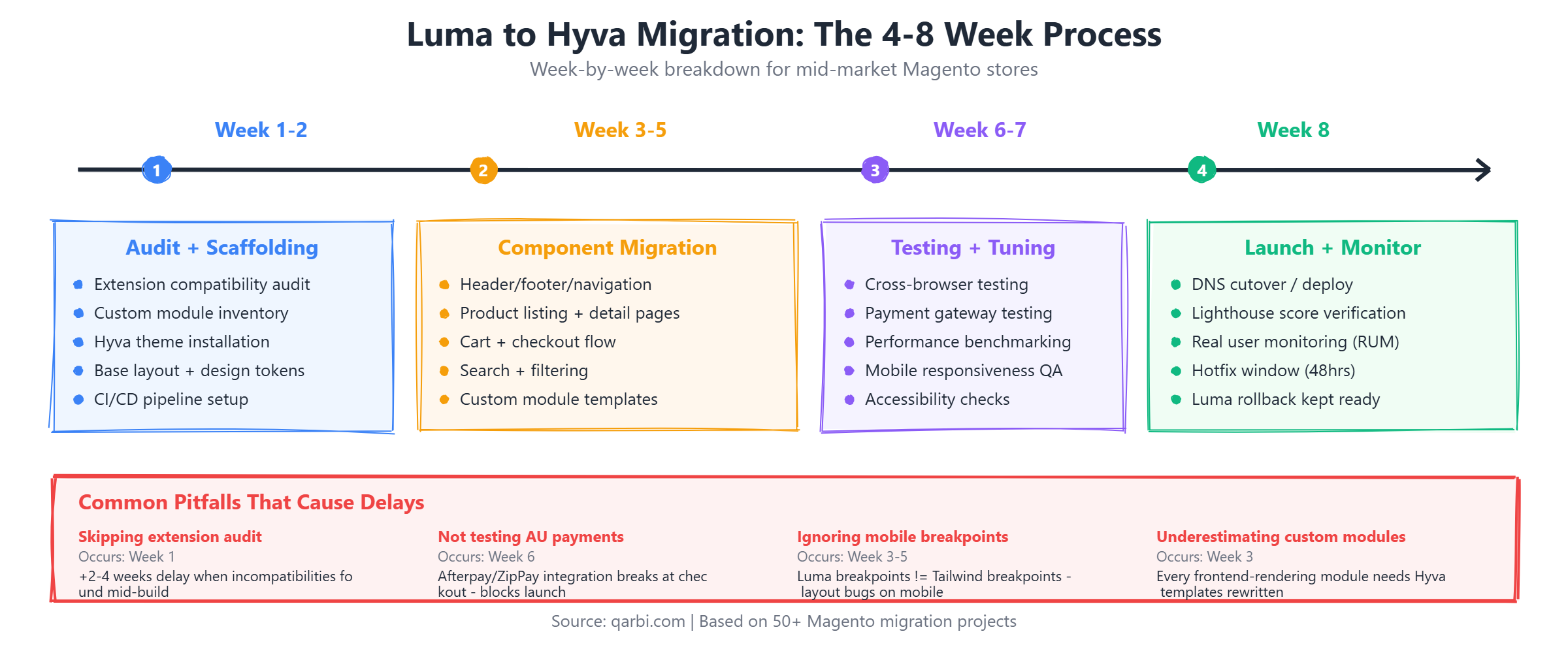
Week 1-2: Audit and Theme Scaffolding
- Extension audit: Catalogue every third-party module. Check each against the Hyva compatibility list. Identify which need Hyva-compatible alternatives or custom compatibility modules.
- Design inventory: Document every custom template, CMS block, and widget in the current Luma theme. This becomes your migration checklist.
- Theme scaffolding: Set up the Hyva base theme, configure Tailwind with your brand's design tokens (colours, typography, spacing), and create the core layout templates.
- Development environment: Establish a staging environment that mirrors production. Run baseline Lighthouse audits on the current Luma store for before/after comparison.
Week 3-5: Component Migration and Extension Compatibility
- Core pages: Rebuild homepage, category pages, product detail pages, and cart/checkout in Hyva templates.
- Navigation and search: Implement mega menu, layered navigation, and search (with Algolia or Elasticsearch if applicable).
- Extension integration: Install Hyva compatibility modules for supported extensions. Build custom compatibility wrappers for unsupported extensions.
- Custom features: Rebuild any bespoke Luma frontend features (product configurators, B2B quote systems, custom checkout steps) using Alpine.js components.
Week 6-7: Testing and Performance Tuning
- Functional testing: Full regression testing across all pages and checkout flows. Test every payment gateway, shipping method, and customer account feature.
- Cross-browser and device testing: Verify rendering on Chrome, Safari, Firefox, Edge, and mobile devices. Pay particular attention to iOS Safari rendering.
- Performance tuning: Optimise image loading (WebP, lazy loading), configure critical CSS inlining, fine-tune Tailwind purge configuration to minimise CSS bundle size.
- Load testing: Simulate peak traffic volumes to verify server-side performance under the new theme.
Week 8: Launch and Monitoring
- Staged rollout: Deploy to a percentage of traffic first if your infrastructure supports it. Monitor error rates and conversion metrics.
- Full launch: Switch all traffic to the Hyva theme. Monitor Google Search Console for any crawl anomalies.
- Post-launch monitoring: Track Core Web Vitals in the field (not just lab scores) for 2-4 weeks. Address any real-user experience issues that lab testing missed.
Where migrations fail: The most common cause of Hyva migration delays and budget overruns is skipping the extension compatibility audit in week one. Teams jump straight into theme development, then discover in week five that a critical extension (payment gateway, ERP connector, shipping calculator) does not work with Hyva and needs a custom compatibility module. Always audit first.
Common Migration Pitfalls
Beyond the general advice to audit first, there are four specific pitfalls we see repeatedly in Hyva migrations. Understanding these in advance can save weeks of delay and thousands of dollars in unplanned development.
Pitfall 1: Skipping the extension audit. This is the single most common cause of Hyva migration failure. Agencies that do not check extension compatibility upfront - " systematically, against the official Hyva compatibility list and the vendor's own documentation - " discover incompatibilities mid-migration. A payment gateway that does not render in Hyva, a shipping calculator that throws JavaScript errors, or a loyalty widget that depends on KnockoutJS bindings can each add two to four weeks of unplanned development. The fix is straightforward: in week one, create a spreadsheet of every installed module, check its Hyva status, and budget for compatibility work before writing a single line of theme code.
Pitfall 2: Not testing checkout flows thoroughly. Checkout is where revenue happens, and it is also where the most complex JavaScript interactions live. Payment gateway integrations are particularly sensitive - " Afterpay, ZipPay, and other buy-now-pay-later providers popular in Australia inject their own JavaScript into the checkout page. These scripts were built to work with Luma's KnockoutJS checkout, and they need explicit Hyva compatibility testing. Do not assume that because the payment provider lists Magento 2 support, it will work with Hyva. Test every payment method end-to-end on staging, including declined transactions and error states, before going live.
Pitfall 3: Ignoring mobile-specific customizations. If your current Luma theme has custom responsive breakpoints, mobile-specific layouts, or touch-optimised interactions, these do not transfer automatically to Hyva. Luma uses a specific set of responsive breakpoints defined in its LESS framework. Tailwind CSS uses a different set of breakpoints by default (sm at 640px, md at 768px, lg at 1024px, xl at 1280px). Your mobile navigation, product grids, and filter panels may need layout adjustments to match the behaviour your customers already expect. Always compare the mobile experience side by side - " Luma staging versus Hyva staging - " on actual devices, not just browser dev tools.
Pitfall 4: Underestimating custom module rewrites. Any Magento module that renders frontend HTML - " meaning any module with template files, layout XML, or JavaScript - " needs Hyva-compatible versions of those frontend assets. Backend-only modules (ERP connectors, cron jobs, API integrations) are unaffected. But modules that add product page tabs, custom checkout steps, account dashboard sections, or promotional widgets all need their templates rewritten in Alpine.js and Tailwind. For stores with five or more custom modules, this can represent 30-40% of the total migration effort. Audit every module and classify it as backend-only or frontend-rendering before scoping the project.
Finally, always plan a rollback strategy. Keep your Luma theme fully deployable throughout the migration period - " do not delete Luma templates, do not remove Luma-specific configuration. The safest approach is to use a separate store view or a feature flag system that lets you switch between Luma and Hyva without redeploying. This allows you to A/B test the new theme with a percentage of traffic before committing to a full cutover, and it gives you a safety net if a critical issue surfaces after launch that cannot be resolved quickly.
Extension Compatibility: What Works and What Doesn't
Hyva maintains an official compatibility list of 250+ extensions that work out of the box or have Hyva-specific compatibility modules. Here is the status of extensions that matter most to Australian mid-market retailers.
The Hyva community maintains a Compatibility Module Tracker - " a searchable database hosted at hyva.io that catalogues over 250 verified extensions with their compatibility status, links to official compatibility modules, and community-contributed patches. Before starting any migration, run your full module list against this tracker. It is updated regularly by both the Hyva core team and the broader developer community, making it the most reliable source of compatibility information available.
For Australian retailers specifically, payment extension compatibility deserves extra attention because buy-now-pay-later providers are deeply embedded in the AU checkout experience. Afterpay has an official Hyva-compatible module maintained by the Afterpay development team - " it works out of the box with minimal configuration. ZipPay requires a community-contributed compatibility patch that rewrites the checkout widget in Alpine.js; it is stable but not officially maintained by Zip. Tyro, the Australian payment terminal provider increasingly used for integrated online payments, has native Hyva support through their latest Magento module. Stripe works via Hyva's checkout compatibility layer, which intercepts Stripe's JavaScript SDK calls and routes them through Alpine.js event handlers instead of KnockoutJS bindings. For all payment integrations, the rule is the same: test the full transaction flow - " successful payment, declined payment, refund, and partial refund - " on staging before going live.
Handling Incompatible Extensions
When an extension is not on the official compatibility list, you have three options:
- Hyva compatibility module: Many extension vendors now offer a separate Hyva compatibility module. Check the vendor's documentation or the Hyva marketplace first.
- Custom compatibility wrapper: For extensions where only the frontend templates are incompatible, a developer can write Hyva-compatible templates (Alpine.js + Tailwind) that call the same backend logic. This typically takes 8-24 hours per extension.
- Replace with a compatible alternative: In some cases, it is faster and cheaper to replace an outdated extension with a Hyva-native alternative than to build a compatibility layer.
The key point: extension incompatibility is rarely a blocker. It is a budget item. The audit in week one quantifies that budget so there are no surprises later.
Hyva vs PWA vs Headless: Which Modern Frontend Is Right for You?
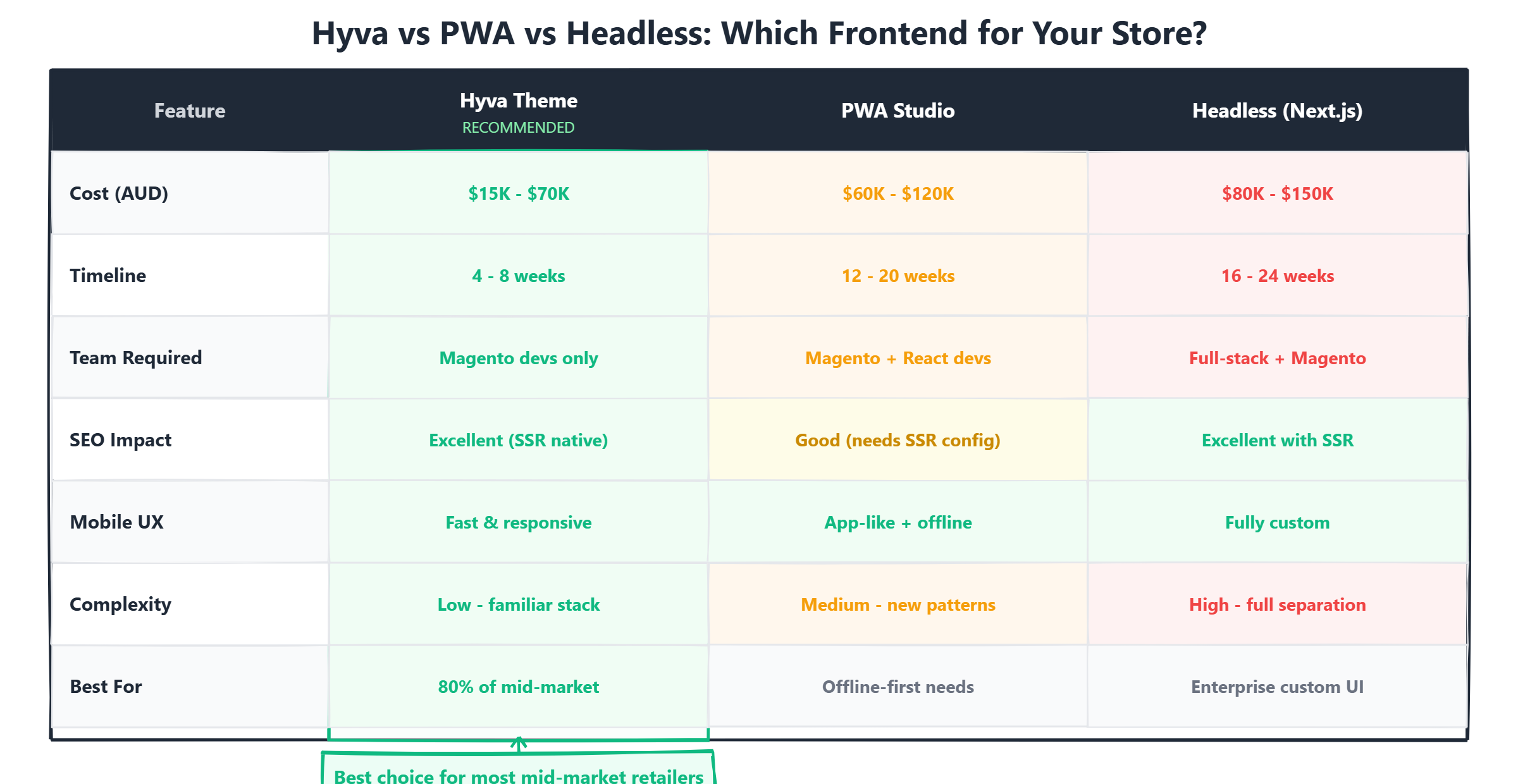
Hyva is not the only option for modernising a Magento frontend. Here is how it compares to the other major approaches, evaluated on the criteria that actually matter for mid-market retail operations.
When Each Approach Wins
- Hyva wins when you want the best performance-to-cost ratio, your team has PHP/Magento experience, and you need to maintain compatibility with existing extensions. This covers roughly 80% of mid-market retailers.
- PWA Studio suits stores that need offline-first capability and are already invested in Adobe's ecosystem. However, community momentum has slowed significantly since 2024.
- Vue Storefront is strong for multi-platform commerce (Magento + Shopify + other backends) where a unified frontend across platforms is a requirement.
- Next.js headless is the right choice for enterprise retailers with dedicated frontend engineering teams who need maximum flexibility and are prepared for the higher cost and maintenance burden.
A practical decision framework makes this choice simpler. Choose Hyva if you want the best ROI for performance improvement without changing your deployment architecture - " your existing hosting, CI/CD pipeline, and team skills all remain relevant. Choose PWA if your customers genuinely need offline functionality, which is rare for most ecommerce use cases but relevant for field sales teams taking orders without connectivity. Choose headless if you need a completely custom frontend experience AND have a team that can maintain a decoupled architecture long-term - " meaning separate frontend and backend deployments, API versioning, and the operational overhead that comes with two independent systems.
There is also a hybrid approach that is gaining traction among mid-market stores that want the best of both worlds. Some retailers use Hyva for the main storefront - " homepage, category pages, product detail pages, cart, and checkout - " but embed headless components for specific high-interactivity features. A product configurator built in React can be mounted as a widget within a Hyva page. Real-time inventory availability can be streamed via WebSocket and displayed through an Alpine.js component. This hybrid model gives you roughly 80% of the performance benefit of a full Hyva migration at approximately 30% of the cost of a full headless build, while keeping your architecture simple enough for a small team to maintain.
When Hyva Is (and Isn't) the Right Choice
Hyva Is a Good Fit When
- Your Magento store is still on Luma or a Luma-based custom theme and performance is hurting conversions.
- You want sub-2-second page loads without a full replatform or headless rebuild.
- Your team has PHP and Magento backend experience but limited React or Vue.js expertise.
- You rely on multiple third-party Magento extensions and cannot afford to rebuild API integrations for a headless setup.
- Your budget is in the $15K-$70K AUD range, not the $100K+ range required for full headless.
- You need results in 4-8 weeks, not 4-6 months.
Hyva May Not Be the Right Fit When
- You need offline-first PWA functionality (e.g., field sales teams taking orders without connectivity).
- You are already on a headless architecture and it is working - " switching to Hyva would be a regression in flexibility.
- You require a completely custom UI that goes beyond what server-rendered Magento templates can support (e.g., 3D product configurators as the core experience).
- You are planning to move away from Magento entirely within 12-18 months - " investing in a Hyva migration for a platform you are leaving does not make sense.
For Australian mid-market retailers on Magento: If your Lighthouse score is below 70 and your load time exceeds 3 seconds, Hyva is likely the highest-ROI investment you can make in your frontend this year. The licence is free, the migration is measured in weeks not months, and the performance improvement is immediate and measurable.
Frequently Asked Questions
Frequently Asked Questions
Is Hyva free?
Yes. As of 2024, Hyva is free and open source under the MIT license. The previous commercial licence fee of approximately EUR 1,000 per year no longer applies. You can download and use Hyva without any licence cost.
Does Hyva work with Adobe Commerce Cloud?
Yes. Hyva is fully compatible with both open-source Magento 2 and Adobe Commerce Cloud. The theme operates at the frontend layer and does not interfere with Commerce Cloud's infrastructure or backend features.
Will Hyva affect my SEO?
Positively. Hyva's smaller JavaScript payload and faster rendering directly improve Core Web Vitals metrics like LCP, CLS, and TTI. Since Google uses these as ranking signals, most stores see measurable improvements in organic search visibility after migration.
How long does Hyva migration take?
Most mid-market stores complete a Hyva migration in 4-8 weeks. Simple catalogue-focused stores can finish in 4-5 weeks. Stores with heavy customisation, multiple integrations, or complex checkout flows typically need 6-8 weeks.
Can I keep my current design with Hyva?
Yes. Hyva uses Tailwind CSS for styling, which means your existing brand design can be faithfully reproduced. The migration replaces the underlying technology stack, not the visual design. Your design is rebuilt in Tailwind components rather than Luma's LESS-based templates.
Ready to fix your store?
Book a free 30-minute audit. We'll review your setup and tell you exactly what we'd do differently.
Book a Free Audit