Every Magento developer knows the friction: you are deep in a module, you need to create a plugin interceptor, and you have to check the Magento DevDocs for the exact method signature, then cross-reference with di.xml, then verify the class exists in the vendor directory. Claude Code changes this workflow fundamentally. It sits in your terminal - the same terminal where you run bin/magento, composer, and phpstan - and it has enough context to scaffold, debug, and review Magento code without switching to a browser or a separate AI chat window.
At Qarbi, we have been using Claude Code across our Magento projects for the past eight months. This is not a theoretical overview or a rewrite of the official documentation. This post covers exactly how we use it, where it saves time, where it falls short, and the specific configurations that make it work for Magento's particular architecture. We will walk through real examples: building a shipping calculator module from scratch, debugging an EAV attribute performance issue, converting Luma templates to Hyva, and connecting Claude Code to a Magento database via MCP servers.
If you are evaluating AI coding assistants for ecommerce development, this guide will give you the practical detail that generic Claude Code tutorials leave out.
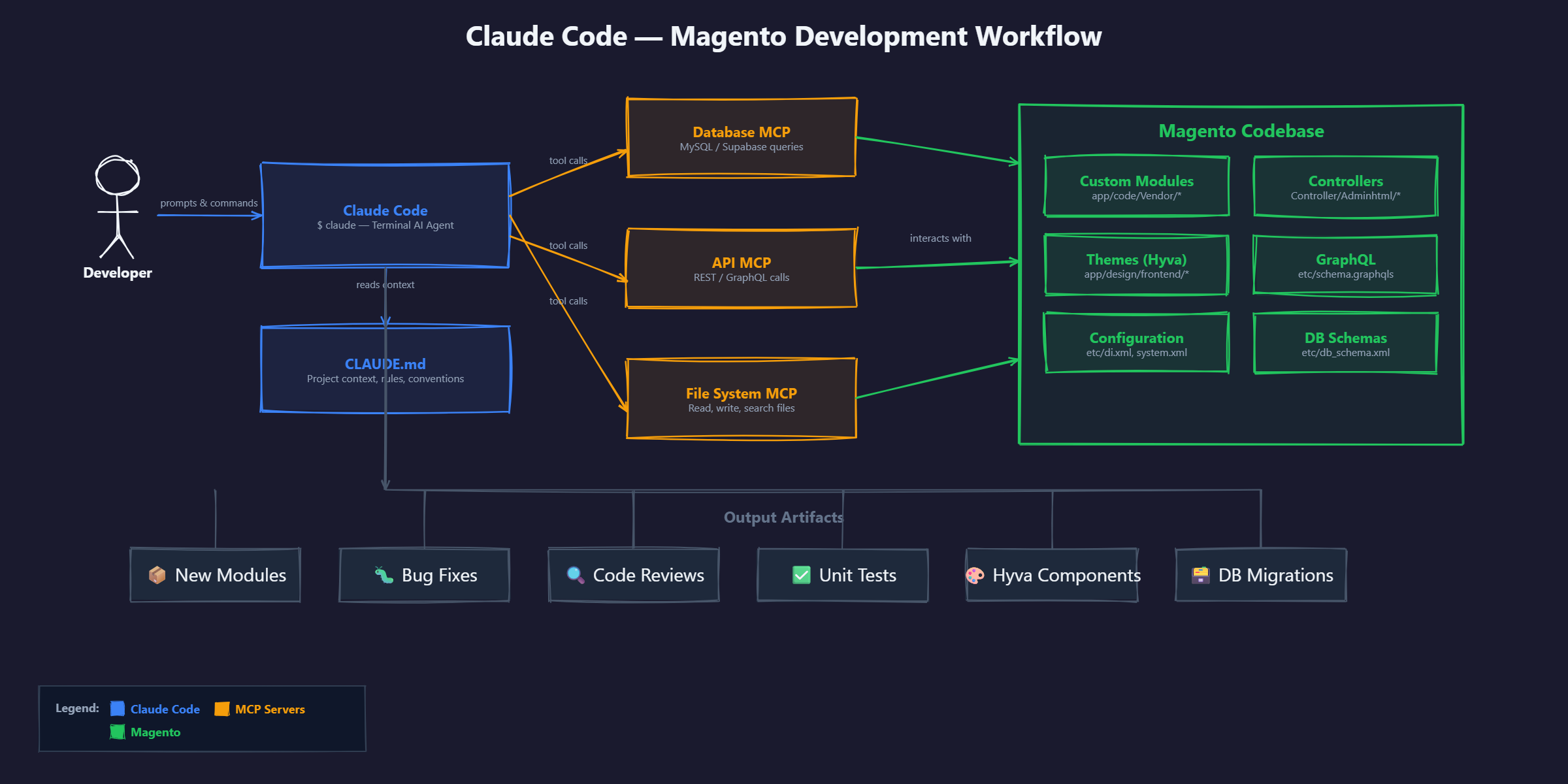
What Is Claude Code (And Why Magento Developers Should Care)
Claude Code is Anthropic's terminal-based AI coding assistant. Unlike browser-based AI tools or IDE extensions, it runs directly in your shell. You open a terminal, type claude, and start a conversation about your codebase. It reads your files, understands your project structure, and can execute commands in your environment.
This matters for Magento development more than for most frameworks, because Magento is inherently CLI-heavy. A typical Magento development session involves running bin/magento setup:upgrade, bin/magento cache:flush, bin/magento module:enable, and various Composer commands. Having an AI assistant in the same terminal where these commands run means zero context switching.
How Claude Code Differs from Cursor and GitHub Copilot
The three tools serve different roles, and understanding the differences prevents choosing the wrong one:
- GitHub Copilot is an autocomplete engine. It predicts the next line or block of code as you type. It works well for completing patterns it has seen before, but it has limited context - typically just the current file and a few nearby files.
- Cursor is an AI-enhanced IDE (a fork of VS Code). It provides chat, code generation, and editing within a visual editor. It handles multi-file context but is optimised for the visual editing workflow.
- Claude Code is a terminal agent. It reads your entire project, can execute shell commands, and operates with a context window of up to 200K tokens (roughly 150,000 words of code). For a Magento module with 40+ files across nested directories, this context capacity is the differentiator.
For Magento work specifically, Claude Code's terminal-first approach means you can ask it to generate a module, immediately run bin/magento setup:upgrade to test it, feed the error output back to Claude Code, and iterate - all without leaving the terminal. This loop is significantly faster than copy-pasting between a browser-based AI and your IDE.
Setting Up Claude Code for Magento Development
Installation
Claude Code requires Node.js 18 or later. Installation is a single command:
npm install -g @anthropic-ai/claude-code
After installation, run claude in your Magento project root to start a session. On first launch, it will ask for your Anthropic API key or prompt you to sign in to your Anthropic account.
You will need an Anthropic subscription. The Max plan (USD $100/month, approximately AUD $155/month) provides the Claude Opus model, which is what we recommend for Magento work. The Sonnet model on lower tiers works for simpler tasks but struggles with the complexity of Magento's dependency injection system and nested XML configurations.
CLAUDE.md: The Most Important File in Your Magento Project
Claude Code reads a CLAUDE.md file from your project root on every session start. This file tells Claude Code about your project's conventions, constraints, and architecture. For Magento projects, a well-structured CLAUDE.md is the difference between useful output and code you have to rewrite.
Here is the CLAUDE.md we use for our Magento projects:
          # CLAUDE.md - Magento 2 Project

## Tech Stack
- Magento 2.4.7 (Adobe Commerce)
- PHP 8.3
- MySQL 8.0
- Elasticsearch 8.x / OpenSearch 2.x
- Redis for cache and session
- Hyva Theme 1.3.x (Alpine.js + Tailwind CSS)

## Coding Standards
- Follow Magento 2 coding standards (PSR-12 based)
- All modules must be in app/code/Vendor/ModuleName/
- Module vendor prefix: Qarbi
- Use strict_types=1 in all PHP files
- Type hint all method parameters and return types
- No direct ObjectManager usage - use dependency injection

## Directory Structure
- app/code/Qarbi/ - Custom modules
- app/design/frontend/Qarbi/hyva/ - Hyva theme customisations
- app/etc/config.php - Module registration
- dev/tests/integration/ - Integration tests

## Common Commands
- bin/magento setup:upgrade - After adding modules
- bin/magento cache:flush - After config changes
- bin/magento setup:di:compile - After DI changes
- bin/magento indexer:reindex - After catalog changes
- vendor/bin/phpstan analyse app/code/Qarbi/ --level 6

## Database
- Table prefix: none
- EAV attributes use Magento's standard attribute sets
- Custom tables must include Qarbi_ prefix

## Important Notes
- Never modify vendor/ files directly
- All customisations through plugins (interceptors) or preferences
- Check existing plugins before creating new ones to avoid conflicts
- Test with bin/magento setup:di:compile before committing
The CLAUDE.md file is loaded into Claude Code's context at the start of every session. Keep it under 500 lines. If it gets longer, you are including information that should be in code comments instead.
Recommended .claude/ Directory Setup
Beyond the root CLAUDE.md, you can create a .claude/ directory with additional configuration:
          # .claude/settings.json - project-level settings
{
  "permissions": {
    "allow": [
      "bin/magento *",
      "composer *",
      "vendor/bin/phpstan *"
    ],
    "deny": [
      "rm -rf *",
      "DROP TABLE *"
    ]
  }
}
The permissions configuration is particularly useful for Magento because it lets Claude Code run bin/magento commands directly to validate its work, while preventing destructive operations. In practice, this means Claude Code can scaffold a module and immediately test it by running bin/magento setup:upgrade.
Module Development: Building a Custom Magento Module with Claude Code
To show Claude Code's capabilities in a real Magento workflow, we will walk through building a custom shipping calculator module. This is a common agency task that touches multiple Magento subsystems: dependency injection, service contracts, admin configuration, and frontend display.
The Prompt
Here is the actual prompt we used:
          Create a Magento 2 module called Qarbi_ShippingCalculator that:

1. Adds a shipping cost estimator widget to the product detail page
2. Takes the customer's postcode as input
3. Calls Australia Post's API to get shipping rates
4. Displays estimated cost and delivery time
5. Caches API responses in Redis for 1 hour
6. Has admin configuration for the Australia Post API key
7. Works with Hyva theme (Alpine.js component, not KnockoutJS)

Follow the coding standards in CLAUDE.md. Create all necessary files including
registration.php, module.xml, di.xml, system.xml, and unit tests.
What Claude Code Generated
Claude Code analysed our CLAUDE.md, understood the Hyva theme requirement, and generated 14 files in the correct Magento directory structure. Here are the key files:
Registration and module declaration:
          <?php
// app/code/Qarbi/ShippingCalculator/registration.php
declare(strict_types=1);

use Magento\Framework\Component\ComponentRegistrar;

ComponentRegistrar::register(
    ComponentRegistrar::MODULE,
    'Qarbi_ShippingCalculator',
    __DIR__
);
          <?xml version="1.0"?>
<!-- app/code/Qarbi/ShippingCalculator/etc/module.xml -->
<config xmlns:xsi="http://www.w3.org/2001/XMLSchema-instance"
        xsi:noNamespaceSchemaLocation="urn:magento:framework:Module/etc/module.xsd">
    <module name="Qarbi_ShippingCalculator" setup_version="1.0.0">
        <sequence>
            <module name="Magento_Catalog"/>
            <module name="Magento_Shipping"/>
        </sequence>
    </module>
</config>
The service contract and implementation:
          <?php
// app/code/Qarbi/ShippingCalculator/Api/ShippingEstimatorInterface.php
declare(strict_types=1);

namespace Qarbi\ShippingCalculator\Api;

interface ShippingEstimatorInterface
{
    /**
     * Get shipping estimate for a product to a given postcode
     *
     * @param int $productId
     * @param string $postcode
     * @return \Qarbi\ShippingCalculator\Api\Data\ShippingEstimateInterface
     */
    public function estimate(int $productId, string $postcode): Data\ShippingEstimateInterface;
}
          <?php
// app/code/Qarbi/ShippingCalculator/Model/ShippingEstimator.php
declare(strict_types=1);

namespace Qarbi\ShippingCalculator\Model;

use Qarbi\ShippingCalculator\Api\ShippingEstimatorInterface;
use Qarbi\ShippingCalculator\Api\Data\ShippingEstimateInterface;
use Qarbi\ShippingCalculator\Api\Data\ShippingEstimateInterfaceFactory;
use Magento\Framework\App\Config\ScopeConfigInterface;
use Magento\Framework\HTTP\Client\Curl;
use Magento\Framework\App\CacheInterface;
use Magento\Framework\Serialize\Serializer\Json;
use Psr\Log\LoggerInterface;

class ShippingEstimator implements ShippingEstimatorInterface
{
    private const CACHE_PREFIX = 'qarbi_shipping_';
    private const CACHE_LIFETIME = 3600;
    private const API_BASE_URL = 'https://digitalapi.auspost.com.au/postage/parcel/domestic/calculate.json';

    public function __construct(
        private readonly ScopeConfigInterface $scopeConfig,
        private readonly Curl $curl,
        private readonly CacheInterface $cache,
        private readonly Json $json,
        private readonly ShippingEstimateInterfaceFactory $estimateFactory,
        private readonly LoggerInterface $logger
    ) {
    }

    public function estimate(int $productId, string $postcode): ShippingEstimateInterface
    {
        $cacheKey = self::CACHE_PREFIX . $productId . '_' . $postcode;
        $cached = $this->cache->load($cacheKey);

        if ($cached) {
            $data = $this->json->unserialize($cached);
            return $this->buildEstimate($data);
        }

        try {
            $result = $this->callAustraliaPostApi($productId, $postcode);
            $this->cache->save(
                $this->json->serialize($result),
                $cacheKey,
                ['qarbi_shipping'],
                self::CACHE_LIFETIME
            );
            return $this->buildEstimate($result);
        } catch (\Exception $e) {
            $this->logger->error('Shipping estimate failed: ' . $e->getMessage());
            throw $e;
        }
    }

    private function callAustraliaPostApi(int $productId, string $postcode): array
    {
        $apiKey = $this->scopeConfig->getValue('qarbi_shipping/general/api_key');
        $fromPostcode = $this->scopeConfig->getValue('qarbi_shipping/general/from_postcode');

        $this->curl->addHeader('AUTH-KEY', $apiKey);
        $this->curl->get(self::API_BASE_URL . '?' . http_build_query([
            'from_postcode' => $fromPostcode,
            'to_postcode' => $postcode,
            'length' => 20,
            'width' => 15,
            'height' => 10,
            'weight' => 1
        ]));

        return $this->json->unserialize($this->curl->getBody());
    }

    private function buildEstimate(array $data): ShippingEstimateInterface
    {
        $estimate = $this->estimateFactory->create();
        $service = $data['postage_result']['service'] ?? null;

        if ($service) {
            $estimate->setCost((float)($service['price'] ?? 0));
            $estimate->setDeliveryDays((int)($service['delivery_time'] ?? 0));
            $estimate->setServiceName($service['name'] ?? 'Standard');
        }

        return $estimate;
    }
}
The Hyva-compatible Alpine.js frontend component:
          <?php
// app/code/Qarbi/ShippingCalculator/ViewModel/ShippingCalculator.php
declare(strict_types=1);

namespace Qarbi\ShippingCalculator\ViewModel;

use Magento\Framework\View\Element\Block\ArgumentInterface;
use Magento\Framework\UrlInterface;

class ShippingCalculator implements ArgumentInterface
{
    public function __construct(
        private readonly UrlInterface $urlBuilder
    ) {
    }

    public function getEstimateUrl(): string
    {
        return $this->urlBuilder->getUrl('shippingcalculator/estimate/index');
    }
}
          <!-- app/design/frontend/Qarbi/hyva/Qarbi_ShippingCalculator/templates/calculator.phtml -->
<?php
/** @var \Magento\Framework\View\Element\Template $block */
/** @var \Qarbi\ShippingCalculator\ViewModel\ShippingCalculator $viewModel */
$viewModel = $block->getData('viewModel');
?>

<div x-data="shippingCalculator()"
     class="mt-4 p-4 border border-gray-200 rounded-lg">
    <h3 class="text-lg font-semibold mb-2">Estimate Shipping</h3>

    <div class="flex gap-2">
        <input type="text"
               x-model="postcode"
               placeholder="Enter postcode"
               maxlength="4"
               pattern="[0-9]{4}"
               class="border border-gray-300 rounded px-3 py-2 w-32"
               @keyup.enter="getEstimate()">

        <button @click="getEstimate()"
                :disabled="loading"
                class="bg-blue-600 text-white px-4 py-2 rounded hover:bg-blue-700
                       disabled:opacity-50 disabled:cursor-not-allowed">
            <span x-show="!loading">Calculate</span>
            <span x-show="loading">Checking...</span>
        </button>
    </div>

    <div x-show="estimate" x-cloak class="mt-3 p-3 bg-green-50 rounded">
        <p class="text-sm">
            <strong x-text="estimate?.serviceName"></strong>:
            $<span x-text="estimate?.cost?.toFixed(2)"></span>
            (<span x-text="estimate?.deliveryDays"></span> business days)
        </p>
    </div>

    <div x-show="error" x-cloak class="mt-3 p-3 bg-red-50 rounded text-red-700 text-sm"
         x-text="error"></div>
</div>

<script>
    function shippingCalculator() {
        return {
            postcode: '',
            loading: false,
            estimate: null,
            error: null,

            async getEstimate() {
                if (this.postcode.length !== 4) {
                    this.error = 'Please enter a valid 4-digit Australian postcode';
                    return;
                }

                this.loading = true;
                this.error = null;

                try {
                    const response = await fetch(
                        '<?= $viewModel->getEstimateUrl() ?>?' +
                        new URLSearchParams({
                            postcode: this.postcode,
                            product_id: '<?= (int)$block->getData("product_id") ?>'
                        })
                    );

                    if (!response.ok) throw new Error('Failed to get estimate');

                    this.estimate = await response.json();
                } catch (e) {
                    this.error = 'Unable to calculate shipping. Please try again.';
                } finally {
                    this.loading = false;
                }
            }
        };
    }
</script>
Iteration and Refinement
The initial output was about 85% correct. Here is what we needed to fix:
- Product weight integration: Claude Code used hardcoded parcel dimensions. We prompted it to pull actual product weight from the catalog and it updated the API call correctly.
- CSRF token handling: The AJAX endpoint needed Magento's form key validation. A follow-up prompt fixed this.
- Error handling for invalid postcodes: The Australia Post API returns specific error codes for invalid postcodes. We asked Claude Code to handle these gracefully and it added proper validation.
Each fix took a single follow-up prompt and 30-60 seconds of generation time. The total process from initial prompt to working module was approximately 25 minutes, compared to our historical average of 4-5 hours for a module of similar complexity.
Debugging Complex Magento Issues with Claude Code
Module creation is straightforward. Debugging is where Claude Code becomes genuinely valuable, because Magento's error messages are often cryptic and the root cause can be several layers removed from the symptom.
Tracing EAV Query Performance Issues
A client's category pages were loading in 8+ seconds. The standard approach would be to enable MySQL slow query logging, identify the problematic queries, trace them back through Magento's collection loading, and figure out which EAV attributes were causing unnecessary joins.
With Claude Code, we fed it the slow query log output and asked it to analyse:
          Here is a slow query from our Magento store's category page load.
It takes 3.2 seconds to execute. The catalog has 12,000 products.

[pasted the full SQL query - a 47-line EAV flat-table join]

Analyse this query. Why is it slow? What Magento configuration
or code could be generating it? How do we fix it?
Claude Code identified three issues within 30 seconds:
- The query was joining 6 EAV attribute tables that were not needed for the category listing (attributes like
meta_keywordandcustom_designthat were not displayed on the frontend). - The flat catalog indexer was disabled, forcing Magento to use EAV joins instead of the flat table.
- A third-party module had added a plugin on the collection's
addAttributeToSelect('*')call, which was pulling all attributes instead of only the ones needed for the listing.
The fix was to enable flat catalog (bin/magento config:set catalog/frontend/flat_catalog_product 1), remove the wildcard attribute selection in the third-party plugin, and reindex. Page load dropped from 8.2 seconds to 1.4 seconds.
Pair this with the product-copy playbook: AI Product Descriptions for Magento: How to Generate SEO-Optimised Copy for 5,000+ SKUs covers the prompt framework, AUD model costs, and Magento REST API import pipeline used to re-describe a 2,400 SKU catalogue in under 3 days.
Debugging Plugin Conflicts
Magento's plugin (interceptor) system is powerful but creates debugging challenges when multiple plugins modify the same method. We had a case where a customer's "Add to Cart" was silently failing - no error in the logs, no exception, just a redirect back to the product page.
We asked Claude Code to analyse the plugin chain:
          Check our di.xml files and find all plugins that intercept
Magento\Checkout\Model\Cart::addProduct or any of its parent methods.
List them in execution order (sortOrder) and identify potential conflicts.
Claude Code scanned our app/code/ directory, found four plugins intercepting the add-to-cart flow, and identified that two of them had the same sortOrder value of 10, creating an undefined execution order. One plugin was returning null from a before method instead of returning the modified arguments array, which silently broke the chain. The fix was a single line change.
When debugging Magento plugin conflicts, always ask Claude Code to map the full interceptor chain before looking at individual plugins. Magento's DI compilation resolves plugin order at build time, and the runtime behaviour can differ from what you expect by reading di.xml files alone.
Hyva Theme Development with Claude Code
Hyva theme development is one of the areas where Claude Code's training data is most immediately useful. Since Hyva uses Alpine.js and Tailwind CSS - both widely covered in Claude's training - the code generation quality is notably higher than for legacy Luma templates.
Building Alpine.js Components
Magento's Luma theme relies heavily on KnockoutJS templates with complex XML layout bindings. Hyva replaces this with Alpine.js components that are simpler to write and maintain. Claude Code generates these components well because Alpine.js has a clean, well-documented API.
Example prompt and output for a product gallery component:
          Build an Alpine.js component for a product image gallery in Hyva.
It should support thumbnail navigation, main image zoom on hover,
and swipe gestures on mobile. Use Tailwind CSS for all styling.
          <div x-data="productGallery()" class="flex flex-col md:flex-row gap-4">
    <!-- Thumbnails -->
    <div class="flex md:flex-col gap-2 order-2 md:order-1 overflow-x-auto md:overflow-y-auto md:max-h-96">
        <template x-for="(image, index) in images" :key="index">
            <button @click="activeIndex = index"
                    :class="{'ring-2 ring-blue-500': activeIndex === index}"
                    class="w-16 h-16 flex-shrink-0 rounded overflow-hidden border">
                <img :src="image.thumb" :alt="image.alt"
                     class="w-full h-full object-cover">
            </button>
        </template>
    </div>

    <!-- Main image with zoom -->
    <div class="relative order-1 md:order-2 flex-1 overflow-hidden rounded-lg"
         @mousemove="handleZoom($event)"
         @mouseleave="zooming = false"
         @mouseenter="zooming = true"
         @touchstart="handleSwipeStart($event)"
         @touchend="handleSwipeEnd($event)">

        <img :src="images[activeIndex]?.full"
             :alt="images[activeIndex]?.alt"
             class="w-full h-auto"
             :style="zooming ? zoomStyle : ''">
    </div>
</div>

<script>
function productGallery() {
    return {
        activeIndex: 0,
        zooming: false,
        zoomStyle: '',
        touchStartX: 0,
        images: [],  // populated from PHP block data

        handleZoom(event) {
            const rect = event.target.getBoundingClientRect();
            const x = ((event.clientX - rect.left) / rect.width) * 100;
            const y = ((event.clientY - rect.top) / rect.height) * 100;
            this.zoomStyle = `transform: scale(2); transform-origin: ${x}% ${y}%;`;
        },

        handleSwipeStart(event) {
            this.touchStartX = event.touches[0].clientX;
        },

        handleSwipeEnd(event) {
            const diff = this.touchStartX - event.changedTouches[0].clientX;
            if (Math.abs(diff) > 50) {
                if (diff > 0 && this.activeIndex < this.images.length - 1) {
                    this.activeIndex++;
                } else if (diff < 0 && this.activeIndex > 0) {
                    this.activeIndex--;
                }
            }
        }
    };
}
</script>
Converting Luma Templates to Hyva
One of the most common Magento agency tasks is migrating existing Luma-based customisations to Hyva. This involves replacing KnockoutJS templates with Alpine.js, swapping RequireJS module dependencies for vanilla JavaScript or Hyva's built-in utilities, and converting LESS stylesheets to Tailwind utility classes.
Claude Code handles this conversion well when given the source template. We typically use a prompt like:
          Convert this Luma .phtml template to Hyva-compatible markup.
Replace all KnockoutJS bindings with Alpine.js equivalents.
Replace LESS class references with Tailwind CSS utilities.
Keep the same functionality. Here is the source:

[paste the Luma template]
The conversion accuracy varies by template complexity. For simple templates (mini-cart, breadcrumbs, newsletter signup), Claude Code produces output that works on the first try roughly 70% of the time. For complex templates (checkout steps, layered navigation with AJAX filtering), expect 2-3 rounds of iteration.
TailwindCSS Utility Generation
Claude Code is particularly effective at generating Tailwind utility classes for Magento components because it understands both Magento's block/template structure and Tailwind's utility naming conventions. We use it to generate responsive product grids, checkout form styling, and category page layouts that follow our design system tokens.
A practical time saver: instead of manually looking up Tailwind class combinations, we describe the visual result we want and let Claude Code generate the utility string. For example: "a product card with a 4:3 image ratio, two lines of title text truncated with ellipsis, price in bold below, and a full-width add-to-cart button on hover" produces a complete set of utility classes in seconds.
Code Review and Quality Assurance
We use Claude Code as a first-pass code reviewer for all Magento pull requests before human review. This catches the mechanical issues (missing type hints, incorrect dependency injection, coding standard violations) so the human reviewer can focus on logic and architecture.
Automated Code Review Prompt
Our standard code review prompt:
          Review the files in app/code/Qarbi/[ModuleName]/ for:

1. Magento 2 coding standard violations (PSR-12, strict_types)
2. Missing dependency injection (direct ObjectManager usage)
3. Plugin interceptor best practices (correct before/after/around signatures)
4. SQL injection vulnerabilities (raw queries without parameter binding)
5. Performance issues (N+1 queries, missing indexes, unnecessary collection loads)
6. Missing or incorrect PHPDoc blocks
7. Hardcoded values that should be in system configuration

Report issues by file with line numbers and suggested fixes.
On a recent module with 23 PHP files, Claude Code identified 7 issues that our developer had missed, including a collection load inside a foreach loop (N+1 query pattern) and a missing escapeHtml() call on user-generated content displayed in a template.
PHPStan Compliance
Magento projects typically run PHPStan at level 6 or higher. Claude Code can both generate PHPStan-compliant code and fix existing violations:
          Run vendor/bin/phpstan analyse app/code/Qarbi/ --level 6
and fix all reported issues. Do not change any business logic -
only fix type errors, missing return types, and incorrect PHPDoc.
This is a task where Claude Code consistently saves 30-45 minutes per module. PHPStan fixes are tedious and mechanical - exactly the type of work an AI assistant should handle.
Claude Code's code review catches mechanical issues reliably but should not replace human review for business logic validation. We use it as a first pass to filter out the noise so developers can focus on the decisions that require human judgment.
MCP Servers: Connecting Claude Code to Your Magento Ecosystem
Model Context Protocol (MCP) servers are what transform Claude Code from a code generator into a full-stack development tool. MCP servers give Claude Code access to external systems - databases, APIs, file systems - through a standardised protocol.
For Magento development, we run three MCP servers:
Database MCP for Direct Query Analysis
The database MCP server gives Claude Code read-only access to your Magento database. This is transformative for debugging because Magento's EAV architecture means that understanding a data issue often requires joining 5-10 tables.
          {
  "mcpServers": {
    "magento-db": {
      "command": "npx",
      "args": ["-y", "@anthropic-ai/mcp-server-mysql"],
      "env": {
        "MYSQL_HOST": "localhost",
        "MYSQL_PORT": "3306",
        "MYSQL_USER": "magento_readonly",
        "MYSQL_PASSWORD": "${MAGENTO_DB_READONLY_PASSWORD}",
        "MYSQL_DATABASE": "magento_staging"
      }
    }
  }
}
Always use a read-only database user and connect to a staging database, never production. Claude Code can execute queries, and a misconfigured permission could lead to data modification.
With the database MCP connected, you can ask Claude Code questions like:
- "Why does product SKU ABC-123 show the wrong price on the frontend?" - Claude Code queries the catalog_product_entity_decimal table, checks price scope configuration, and traces the value through tier pricing and catalog rules.
- "Which EAV attributes are not used by any product in the catalog?" - Claude Code queries attribute values across all EAV tables and identifies attributes with zero entries, helping clean up attribute bloat.
- "Show me all customers who placed orders in the last 30 days but do not have an account" - Claude Code joins sales_order with customer_entity to identify guest checkout patterns.
API MCP Servers for Integration Testing
For stores that integrate with external systems (payment gateways, ERPs, shipping providers), API MCP servers let Claude Code test these integrations directly:
          {
  "mcpServers": {
    "magento-rest": {
      "command": "npx",
      "args": ["-y", "@anthropic-ai/mcp-server-fetch"],
      "env": {
        "BASE_URL": "https://staging.example.com.au/rest/V1/"
      }
    }
  }
}
This lets Claude Code call Magento's REST API to verify that a module's endpoints return the expected data structure, test authentication flows, and validate response formats against the service contract definitions.
Practical Example: Debugging a Stock Sync Issue
A client reported that stock levels on the frontend did not match their ERP. With the database MCP connected, we asked Claude Code to investigate:
          Check the current stock data for SKU 'WIDGET-500' in both the
cataloginventory_stock_item table and the inventory_source_item table.
Compare the quantities across all inventory sources.
Also check the inventory_reservation table for any pending reservations.
Claude Code ran four queries, identified that the multi-source inventory (MSI) had a reservation that was not being cleared after order shipment, and traced the issue to a missing observer on the sales_order_shipment_save_after event in a custom module. Total debugging time: 12 minutes. Our estimate for manual debugging of the same issue: 2-3 hours.
Claude Code vs Cursor vs GitHub Copilot for Magento Development
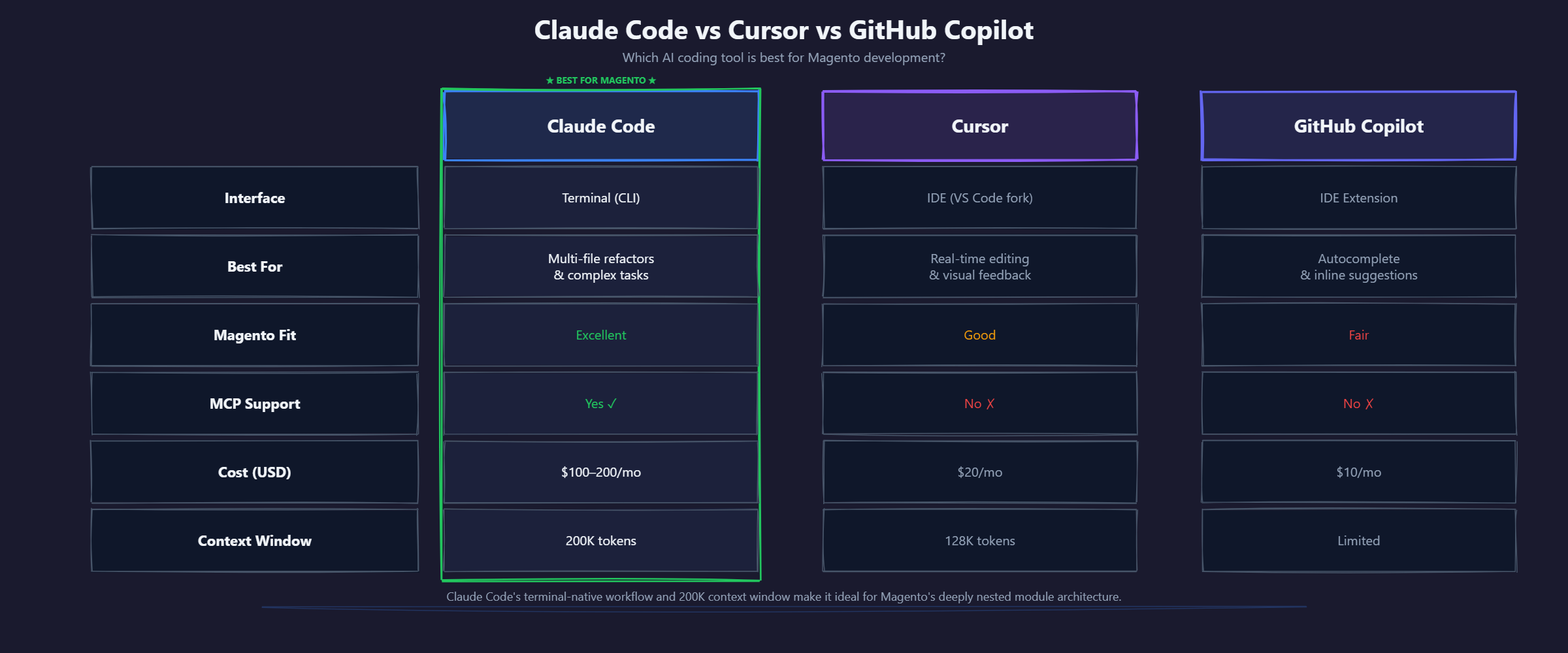
Each tool has strengths. Here is an honest comparison based on our experience using all three across Magento projects over the past year.
When to Use Each Tool
Use Claude Code when: You need to create or significantly modify a Magento module, debug a complex issue that spans multiple files, run code review against Magento standards, or need database-level debugging via MCP. The terminal-first approach and large context window make it the strongest option for Magento's deeply nested, multi-file architecture.
Use Cursor when: You are making focused edits to known files, need visual diff review, or prefer an IDE-centric workflow. Cursor's composer feature is effective for smaller, targeted changes where you know which files need modification.
Use GitHub Copilot when: You are writing code line by line and want autocomplete suggestions. Copilot's inline suggestions are fast and unobtrusive for routine coding. It is the weakest option for Magento-specific work because it lacks the context to understand module interdependencies.
Many developers on our team use Claude Code and Copilot together: Copilot for autocomplete while coding, Claude Code for the heavy lifting of module creation, debugging, and review.
For a broader view of how AI tools are changing ecommerce development workflows, our Magento development services page covers how we integrate these tools into client projects.
Real Productivity Metrics: Before and After Claude Code
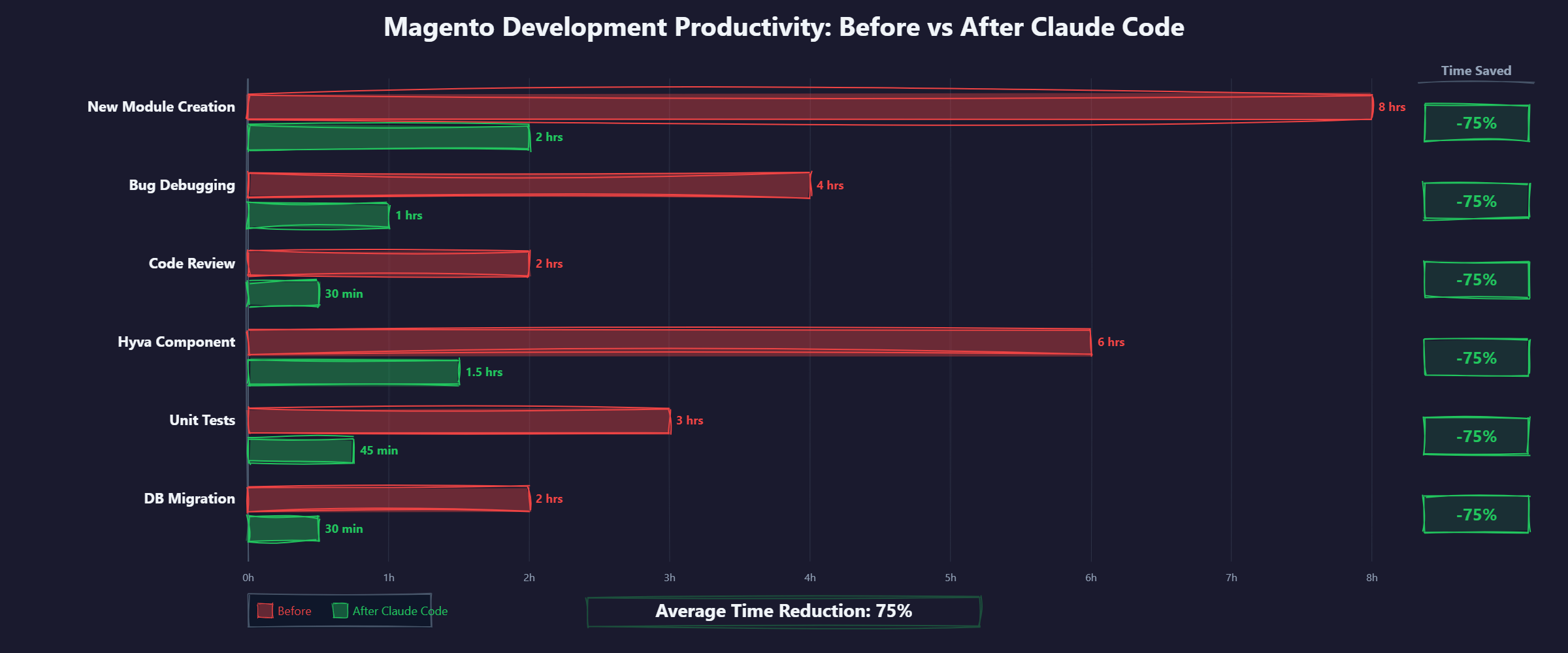
We tracked task completion times across our Magento development team for three months before adopting Claude Code and three months after. Here are the results across common task types.
Across all task types, the average time reduction was 58%. The gains are largest for boilerplate-heavy, pattern-following work (module scaffolding, PHPStan fixes, code review) and smallest for tasks requiring nuanced understanding of business logic (admin UI components, complex checkout customisations).
Cost-Benefit Analysis (AUD)
For a team of 3 Magento developers:
- Claude Code cost: AUD $155/month x 3 developers = AUD $465/month
- Average billable rate: AUD $180/hour per developer
- Average hours saved per developer per week: 6-8 hours
- Value of recovered time: 7 hours x $180 x 3 developers x 4.3 weeks = AUD $16,254/month
- ROI: 34:1 (for every dollar spent on Claude Code, we recover approximately $34 in developer time)
These numbers assume the recovered time is redirected to billable work. Even at a conservative 50% utilisation of the saved time, the ROI is 17:1.
These metrics are from our team of experienced Magento developers (3+ years). Junior developers may see lower time savings because they need more time to evaluate and correct Claude Code's output. The tool is an accelerator for existing skill, not a substitute for it.
Common Mistakes and What We Learned
Eight months of using Claude Code for Magento development has taught us where the tool works reliably, where it fails predictably, and where the failure modes are subtle enough to cause real problems.
Mistake 1: Over-Relying on AI for Architecture Decisions
Claude Code can generate a complete module architecture, but that does not mean it should. We learned this when we asked Claude Code to design the data model for a complex B2B quoting system. It produced a working schema, but the design was naive - it used flat tables where EAV would have been more appropriate for the configurable attributes, and it missed the need for a separate quote revision history table.
The lesson: use Claude Code for implementation, not architecture. Human developers should make the structural decisions (which design patterns to use, how data flows between modules, where to draw service boundaries) and then use Claude Code to implement those decisions quickly.
Mistake 2: Not Validating di.xml Output
Magento's dependency injection configuration is where Claude Code makes its most dangerous mistakes. The code will compile and pass PHPStan, but the runtime behaviour can be wrong in subtle ways. Common issues we have seen:
- Generating a
<preference>when a plugin would be more appropriate, accidentally overriding all other modules' customisations of the same class. - Setting incorrect
sortOrdervalues on plugins, causing them to execute before a plugin they depend on. - Missing
typedeclarations for virtual types, causing dependency injection failures that only appear at runtime after compilation.
Our rule now: every di.xml change generated by Claude Code gets a manual review by a senior developer, followed by a full DI compile test (bin/magento setup:di:compile) before merging.
Prompt Engineering Tips for Magento Context
Generic prompts produce generic output. Here are the prompt patterns that produce the best results for Magento work:
- Specify the module context: Instead of "create a product attribute", say "create a product attribute of type varchar in the Qarbi_CustomAttributes module using a data patch."
- Reference Magento version explicitly: "Using Magento 2.4.7 conventions" prevents Claude Code from generating deprecated patterns.
- Mention the frontend framework: "For Hyva theme (Alpine.js, not KnockoutJS)" prevents Luma-style template generation.
- Include the test requirement: "Include integration tests using Magento's test framework" produces better test coverage than asking for tests separately.
- State what NOT to do: "Do not use ObjectManager directly. Do not modify vendor files. Do not use raw SQL queries." Negative constraints are as important as positive instructions.
Mistake 3: Ignoring Context Window Limits
Claude Code's 200K token context window is large but not infinite. A full Magento project can easily exceed this. When the context overflows, Claude Code starts losing track of earlier parts of the conversation, which leads to inconsistent code generation.
Our solution: work module by module, not project-wide. Start a fresh Claude Code session for each module or major task. Use the CLAUDE.md file to provide project-level context so you do not need to re-explain conventions in every session.
Getting Started: A Practical Checklist
If you want to start using Claude Code for Magento development, here is the sequence we recommend:
- Install Claude Code:
npm install -g @anthropic-ai/claude-code - Set up your Anthropic account with the Max plan (AUD $155/month)
- Create a CLAUDE.md in your Magento project root (use our template above as a starting point)
- Configure .claude/settings.json with permissions for bin/magento commands
- Set up a read-only database MCP server pointing to your staging database
- Start with a low-risk task: ask Claude Code to write unit tests for an existing module
- Gradually move to module scaffolding and debugging as you learn the prompt patterns
- Establish a team convention: all Claude Code-generated di.xml changes require manual review
For teams evaluating AI tools for ecommerce development, our Magento development services include AI-assisted development workflows as part of our standard engagement.
The investment is modest (AUD $155/month per developer), the learning curve is approximately one week for a developer already comfortable with the terminal, and the productivity gains are measurable from the first day. Start with the easy wins - PHPStan fixes, code review, test generation - and expand from there.
On the SEO side of the same AI workflow, our companion guide on AI SEO tools for Magento covers how the same Claude Code stack handles technical audits, meta tag generation at catalogue scale, JSON-LD schema automation, and internal linking analysis. The two posts together describe the full AI-assisted workflow we run on Qarbi and client stores.
Related: Building a custom AI chatbot for your Magento store? Our companion guide compares 5 AI chatbot solutions for Magento with AUD pricing, integration methods, and conversion data.
Frequently Asked Questions
How much does Claude Code cost for a Magento development team?
Claude Code requires an Anthropic API subscription. The Max plan costs approximately USD $100/month per developer (roughly AUD $155/month). For a team of 3 developers, expect AUD $465/month. Based on our data, the time savings on Magento projects offset this cost within the first week of use.
Can Claude Code replace a Magento developer?
No. Claude Code accelerates experienced developers but cannot replace them. It does not understand your business logic, cannot make architectural trade-off decisions, and frequently generates code that passes syntax checks but fails Magento's runtime expectations (particularly around dependency injection and plugin interceptors). You need a developer who can evaluate and correct the output.
Does Claude Code work with Magento 2.4.7 and PHP 8.3?
Yes. Claude Code's training data includes Magento 2.4.x and PHP 8.x patterns. You should specify exact version constraints in your CLAUDE.md file so it generates compatible code. We have tested it extensively with Magento 2.4.7 on PHP 8.3 without compatibility issues in the generated code.
Is Claude Code better than Cursor for Magento development?
For Magento specifically, Claude Code has advantages because of its terminal-first approach and larger context window. Magento modules span many files across deep directory structures, and Claude Code can hold all of them in context simultaneously. Cursor is better for visual file browsing and smaller, single-file edits. Many developers use both.
Can Claude Code connect to my Magento database?
Yes, through MCP (Model Context Protocol) servers. You configure a database MCP server that gives Claude Code read access to your Magento database. This lets it query catalog data, check EAV attribute configurations, and analyse indexer status directly. We recommend read-only access on a staging database, never production.
Frequently Asked Questions
How much does Claude Code cost for a Magento development team?
Claude Code requires an Anthropic API subscription. The Max plan costs approximately USD $100/month per developer (roughly AUD $155/month). For a team of 3 developers, expect AUD $465/month. Based on our data, the time savings on Magento projects offset this cost within the first week of use.
Can Claude Code replace a Magento developer?
No. Claude Code accelerates experienced developers but cannot replace them. It does not understand your business logic, cannot make architectural trade-off decisions, and frequently generates code that passes syntax checks but fails Magento's runtime expectations (particularly around dependency injection and plugin interceptors). You need a developer who can evaluate and correct the output.
Does Claude Code work with Magento 2.4.7 and PHP 8.3?
Yes. Claude Code's training data includes Magento 2.4.x and PHP 8.x patterns. You should specify exact version constraints in your CLAUDE.md file so it generates compatible code. We have tested it extensively with Magento 2.4.7 on PHP 8.3 without compatibility issues in the generated code.
Is Claude Code better than Cursor for Magento development?
For Magento specifically, Claude Code has advantages because of its terminal-first approach and larger context window. Magento modules span many files across deep directory structures, and Claude Code can hold all of them in context simultaneously. Cursor is better for visual file browsing and smaller, single-file edits. Many developers use both.
Can Claude Code connect to my Magento database?
Yes, through MCP (Model Context Protocol) servers. You configure a database MCP server that gives Claude Code read access to your Magento database. This lets it query catalog data, check EAV attribute configurations, and analyse indexer status directly. We recommend read-only access on a staging database, never production.
Ready to fix your store?
Book a free 30-minute audit. We'll review your setup and tell you exactly what we'd do differently.
Book a Free Audit