Your Magento store loads in 4.5 seconds. Your competitor loads in 1.8 seconds. You are not just losing a speed test - you are losing revenue every single day. And the gap is wider than you think.
For mid-market retailers doing $5M to $50M in annual revenue, page speed is not a vanity metric. It is a direct line item on your P&L. Every fraction of a second translates to real dollars gained or lost. This guide breaks down the actual financial impact of a slow Magento store, identifies the five most common bottlenecks we see across hundreds of audits, and gives you a prioritized roadmap to fix them - complete with expected costs, timelines, and ROI.
Whether you are running Magento Open Source or Adobe Commerce, on Luma or considering Hyva theme, this is the performance playbook your store needs in 2026.
The Revenue Impact of Page Speed
Let us stop talking about page speed as a technical problem and start talking about it as a revenue problem. The data is clear, consistent, and backed by billions of dollars in transaction research.
Here are the numbers that matter:
- 7% conversion loss per additional second of load time - This figure comes from a widely cited Akamai study and has been corroborated by research from Google and Deloitte. For a store converting at 2%, each extra second drops you to roughly 1.86%.
- Amazon calculated that a 1-second delay would cost them $1.6 billion per year in lost sales. Walmart found that for every 1 second of improvement in page load time, conversions increased by 2%.
- 53% of mobile users abandon a site that takes longer than 3 seconds to load (Google, 2023). With mobile now accounting for 60-70% of ecommerce traffic, this is not a footnote - it is the headline.
- Google confirmed page experience as a ranking signal in 2021 and has continued to refine Core Web Vitals as part of its search algorithm. Slow stores do not just lose conversions - they lose organic visibility too.
- Deloitte found that a 0.1-second improvement in mobile site speed increased conversions by 8.4% for retail sites and 10.1% for travel sites. Even marginal gains compound at scale.
For a store doing $10M per year with a 2% conversion rate, dropping from 4.5 seconds to 2 seconds could mean an additional $700K to $1.4M in annual revenue. That is not a guess - it is math.
But let us make it more concrete. The table below shows estimated annual revenue loss at different load times for stores at various revenue tiers, assuming a 7% conversion drop per second of delay beyond a 1-second baseline:
These numbers assume a linear 7% loss per second, which is conservative. In practice, the drop-off accelerates - users who wait 4 seconds are far less patient than those who waited 2. Bounce rates spike exponentially after the 3-second mark.
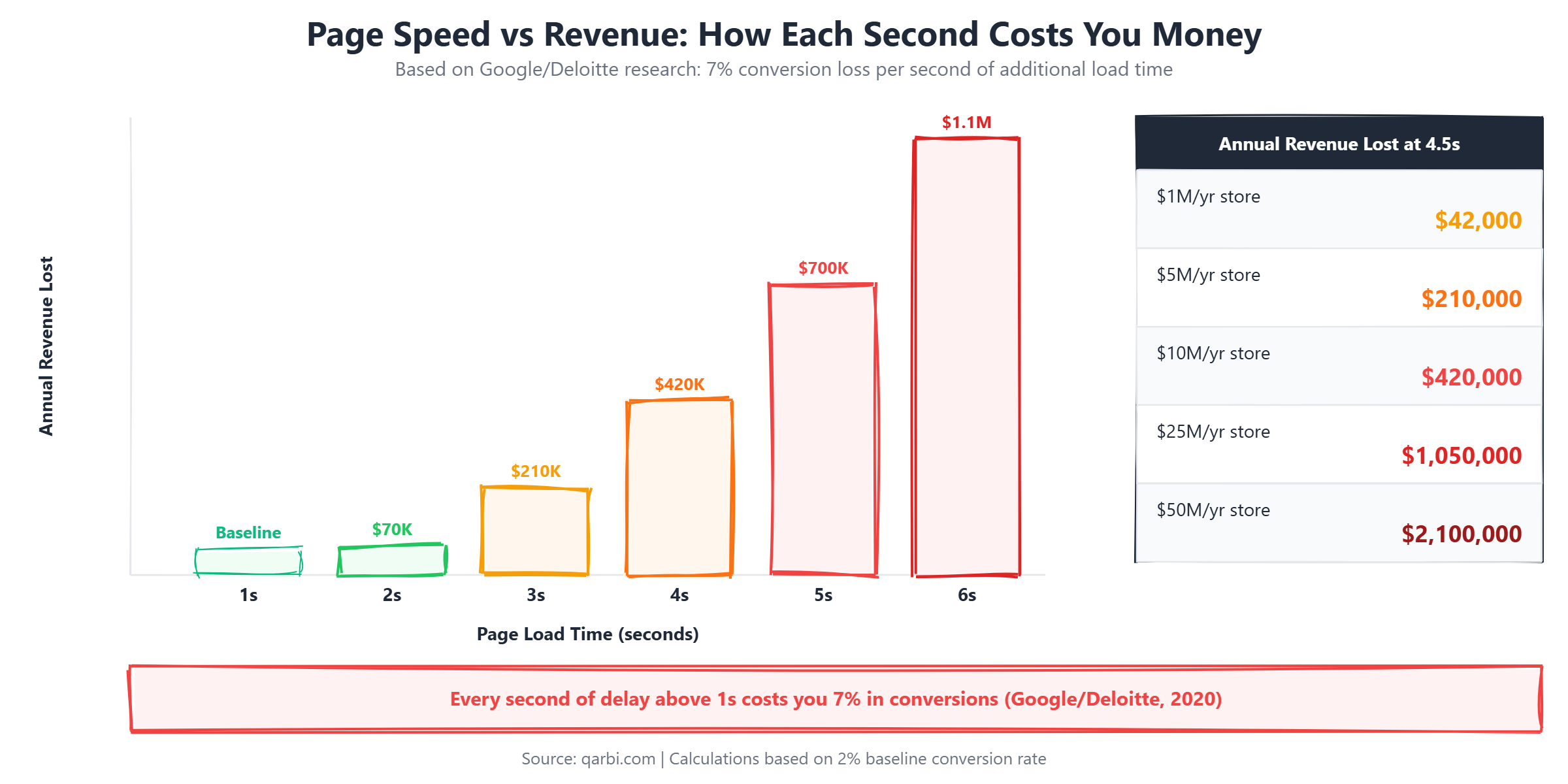
The mobile story is even more dramatic. Google's research shows that the probability of bounce increases 32% when page load time goes from 1 second to 3 seconds, and 90% when it goes from 1 second to 5 seconds. If your Magento store is not sub-3-seconds on mobile, you are effectively turning away half your mobile traffic before they see a single product.
The bottom line: A $10M store running at 4.5 seconds is leaving approximately $2.1M to $2.5M on the table annually. A $50M store in the same situation is looking at $10M or more in lost revenue. Performance optimization is not an IT expense - it is your highest-ROI investment.
Understanding Core Web Vitals for Magento
Google's Core Web Vitals are the specific metrics that determine whether your store passes the page experience ranking signal. As of 2024, the three metrics are LCP, CLS, and INP. Understanding what each one means in the context of Magento is critical because Magento's architecture creates unique challenges for each.
Largest Contentful Paint (LCP) measures how quickly the main content of a page loads. For Magento stores, this is typically the hero image on the homepage, the main product image on PDP, or the category banner on PLP. Google considers under 2.5 seconds "good," 2.5 to 4 seconds "needs improvement," and over 4 seconds "poor." The average unoptimized Magento 2 store on Luma scores 4 to 8 seconds on LCP - firmly in the "poor" range.
Cumulative Layout Shift (CLS) measures visual stability - how much the page layout shifts while loading. Magento stores commonly fail CLS due to images without width/height attributes, late-loading ad banners, web fonts that cause text reflow, and dynamically injected content from extensions. Google considers under 0.1 "good," 0.1 to 0.25 "needs improvement," and over 0.25 "poor."
Interaction to Next Paint (INP) replaced First Input Delay (FID) in March 2024 and measures overall page responsiveness. INP tracks the latency of all user interactions - clicks, taps, keyboard inputs - throughout the page lifecycle, not just the first one. Magento stores struggle with INP because of heavy JavaScript execution from RequireJS, KnockoutJS, and third-party extensions that block the main thread. Google considers under 200ms "good," 200 to 500ms "needs improvement," and over 500ms "poor."
Here is what we typically see in Magento 2 stores before and after performance optimization:
How to measure: Use Google PageSpeed Insights for field data (real user metrics from the Chrome UX Report), Lighthouse for lab data (synthetic tests), and WebPageTest for detailed waterfall analysis. For ongoing monitoring, Google Search Console's Core Web Vitals report shows which URLs pass or fail across your entire site.
The key insight for Magento store owners: passing Core Web Vitals is not just about speed - it is about Google ranking. Sites that pass all three Core Web Vitals metrics get a measurable ranking boost in organic search. For ecommerce stores where organic traffic drives 30-50% of revenue, failing Core Web Vitals is equivalent to a slow SEO penalty.
The 5 Most Common Magento Performance Bottlenecks
After auditing hundreds of Magento stores across Australia, the US, and Europe, we see the same five bottlenecks over and over. Here is each one in detail, with specific diagnostics and fixes.
1. Unoptimized Database Queries
This is the most common culprit and the one that scales worst. Magento's EAV (Entity-Attribute-Value) database structure is flexible - it lets you add unlimited product attributes without schema changes - but it is fundamentally slow at scale.
Here is why: a simple query like "get all products in this category with their names, prices, and images" requires JOINing across multiple EAV tables. Each attribute (name, price, description, image, color, size) lives in a separate table. A category page with 200 products might need to JOIN 6-10 tables per product, resulting in a massive query chain.
On an unoptimized Magento 2 store, we typically see:
- 500 to 2,000 database queries per page load on category and search results pages
- 2 to 5 seconds of total database time per uncached page request
- N+1 query problems where the ORM fires a separate query for each product in a collection instead of batching
- Missing indexes on frequently filtered attributes, causing full table scans on catalog_product_entity_* tables
          -- A typical slow category page generates:
-- 347 queries, 2.3 seconds total DB time
-- After optimization:
-- 12 queries, 0.1 seconds total DB time

-- Common offender: loading product media gallery
SELECT * FROM catalog_product_entity_media_gallery_value
WHERE entity_id IN (1,2,3...200)
-- This fires 200 individual queries without flat catalog
How to fix it:
- Enable flat catalog tables (Stores > Configuration > Catalog > Storefront). This denormalizes the EAV structure into flat tables, reducing JOINs dramatically. Expected improvement: 30-50% faster product and category page loads.
- Add proper MySQL indexes on attributes used in layered navigation and sorting. Run EXPLAIN on your slowest queries and add composite indexes where needed.
- Enable MySQL query cache or use ProxySQL for query caching on high-traffic stores.
- Profile with New Relic or Blackfire to identify the specific queries consuming the most time. Focus on the top 10 slowest queries first - they typically account for 80% of database time.
- Rewrite collection loading in custom modules that use inefficient ORM patterns. Replace lazy loading with eager loading using addAttributeToSelect() and joinField().
2. Missing or Misconfigured Full-Page Cache
Magento 2 supports Varnish as a full-page cache out of the box, but a surprising number of stores either do not use it, use the built-in file-based cache instead, or have Varnish misconfigured to the point where it provides minimal benefit.
A properly configured Varnish setup can serve cached pages in under 100ms - that is a 10x to 50x improvement over uncached Magento page generation, which typically takes 1 to 5 seconds.
The most common Varnish issues we see:
- Low hit rate: A healthy Varnish cache should have a hit rate of 90% or higher. Many stores we audit are at 40-60% because of misconfigured VCL (Varnish Configuration Language) rules that fail to cache pages correctly.
- Missing or incorrect VCL rules: Magento generates a default VCL file, but it often needs customization for your specific setup. Custom modules that set cookies on every request, for example, will bypass Varnish entirely.
- Incorrect TTL settings: Time-to-live values that are too short (under 1 hour) mean Varnish constantly re-fetches pages from Magento. For most product and category pages, a TTL of 24 hours with proper cache invalidation via tags is ideal.
- No cache warming: After a cache flush (during reindexing or deployment), all pages are uncached simultaneously, causing a traffic spike to the backend. A cache warmer script that crawls your top 500 URLs after deployment prevents this.
- Session and cookie issues: Extensions that set session cookies on every page load - including for guest users - prevent Varnish from caching those pages. This is one of the most common "silent killers" of cache hit rates.
How to check your hit rate: Run varnishstat on your server and look at the MAIN.cache_hit and MAIN.cache_miss counters. Divide hits by (hits + misses) to get your hit rate percentage. Alternatively, check response headers in your browser DevTools - cached responses will have X-Magento-Cache-Debug: HIT.
Expected improvement: Going from no Varnish to a properly configured Varnish setup typically reduces TTFB from 1-3 seconds to under 100ms for cached pages. This is the single highest-impact, lowest-effort performance fix for any Magento store.
3. The Luma Frontend Tax
Magento's default Luma theme ships with a JavaScript and CSS payload that was already heavy when it launched in 2015. In 2026, it is a serious liability.
Here is the breakdown of what Luma loads on every single page:
- RequireJS: ~95KB (module loader from 2012)
- KnockoutJS: ~65KB (data binding library, used for checkout and dynamic UI)
- jQuery + jQuery UI + plugins: ~87KB + ~250KB for UI widgets
- Magento core JS modules: ~200-400KB depending on page type
- CSS (compiled from LESS): ~300-500KB of render-blocking stylesheets
- Total typical payload: 1.0 to 1.8MB of JavaScript and CSS before any third-party scripts
Every kilobyte of JavaScript has to be downloaded, parsed, compiled, and executed by the browser. On a mid-range mobile phone over a 4G connection, this translates to 3 to 6 seconds of processing time before the page becomes interactive. That is before your product images, fonts, or analytics scripts even load.
The Luma architecture also uses RequireJS for dependency management, which creates a waterfall loading pattern. Instead of loading scripts in parallel, each module waits for its dependencies to load first, creating a chain of sequential requests that dramatically increases total load time.
The fix: Hyva theme. It replaces the entire Luma frontend stack with Alpine.js (~15KB) and Tailwind CSS (~15KB compressed), reducing the total JavaScript payload from over 1MB to approximately 30KB. That is an 80-97% reduction in frontend weight.
In our experience migrating stores from Luma to Hyva, we consistently see page load times drop from 4-6 seconds to 1.5-2.5 seconds, LCP improve by 50-70%, and INP scores move from "poor" to "good" range. For stores where frontend performance is the primary bottleneck, Hyva migration is the single most impactful long-term investment.
We are certified Hyva developers and have completed migrations for stores ranging from $2M to $40M in annual revenue. Read our complete guide: Hyva Theme: The Complete Guide for Magento in 2026.
4. Unoptimized Images
This is the lowest-hanging fruit and often the fastest fix, yet we still see it on the majority of Magento stores we audit. The problem is straightforward: product images are served as 2000x2000px PNGs or JPEGs when the browser only needs a 400px image, there is no lazy loading, and there are no responsive srcset attributes telling the browser which size to download.
The impact is significant. Images typically account for 50-80% of total page weight on ecommerce sites. A category page with 40 products, each showing a 500KB unoptimized image, is loading 20MB of image data. With proper optimization, that same page can load under 2MB.
Here is what proper image optimization looks like for Magento:
- WebP format: WebP images are 30-50% smaller than equivalent JPEG/PNG files at the same visual quality. Magento 2.4+ supports WebP conversion natively via the catalog image resize command, or you can use a CDN like Cloudflare or Cloudinary that converts on the fly.
- Lazy loading: Images below the fold should not load until the user scrolls near them. Magento 2.4.4+ includes native lazy loading support. For older versions, use the loading="lazy" attribute on img tags or implement Intersection Observer via a module.
- Responsive images with srcset: Serve different image sizes based on the user's viewport. A mobile user on a 375px-wide screen does not need a 2000px image. Implement srcset and sizes attributes so the browser downloads only what it needs.
- Compression tools: Use TinyPNG, ImageOptim, or Squoosh for batch compression before upload. For automated optimization, Cloudinary or imgix can handle resizing, format conversion, and compression via URL parameters.
- Set explicit width and height: Always include width and height attributes on img tags to prevent Cumulative Layout Shift (CLS). This tells the browser how much space to reserve before the image loads.
Expected improvement: Proper image optimization typically reduces page weight by 40-70% and improves LCP by 1-3 seconds. For stores with large product catalogs (10,000+ SKUs), automated image optimization via a CDN is essential - manual optimization is not sustainable at scale.
5. Underpowered Hosting
Running Magento 2 on shared hosting or an undersized VPS is like running a Formula 1 engine on regular unleaded. Magento is a resource-intensive application that requires specific server components to perform well. Cutting corners on hosting is a false economy - the revenue lost to slow load times far exceeds the savings on hosting costs.
Here are the minimum recommended specs for a Magento 2 store in production:
- CPU: 4 vCPU minimum (8 vCPU recommended for stores with 10,000+ SKUs or high traffic)
- RAM: 8GB minimum (16GB recommended). Magento, MySQL, Redis, Elasticsearch, and PHP-FPM all need memory. Running them all on 4GB will result in swap usage and severe performance degradation.
- Storage: NVMe SSD mandatory. Traditional HDDs or even SATA SSDs create I/O bottlenecks during indexing and cache operations. The difference between NVMe and HDD for Magento database operations is 10-50x.
- PHP: PHP 8.2 or 8.3 with OPcache enabled and properly tuned. PHP 8.x is 15-25% faster than PHP 7.4 for Magento workloads. OPcache should have at least 256MB of memory allocated.
- Redis: Required for session storage and cache backend. Do not use file-based sessions or cache in production - Redis is 10-100x faster.
- Elasticsearch or OpenSearch: Required for catalog search in Magento 2.4+. Allocate at least 2GB of heap memory.
- Varnish: Required for full-page caching (see section above).
For Australian retailers: Hosting location matters enormously for local customers. If your primary market is Australia, your server should be in the AWS ap-southeast-2 (Sydney) region, Google Cloud australia-southeast1 (Sydney), or DigitalOcean SGP1 (Singapore, closest available). Serving an Australian customer from a US-based server adds 150-250ms of latency on every single request - that is before Magento even starts processing.
Hosting cost comparison for Magento 2 (AUD/month):
- Shared hosting: $20-50/month - Not suitable for Magento 2 in production. Period.
- Basic VPS (2 vCPU, 4GB RAM): $40-80/month - Minimum for development/staging. Too slow for production.
- Production VPS (4 vCPU, 8GB RAM, NVMe): $100-200/month - Minimum viable production setup for stores under $1M revenue.
- Managed Magento hosting (Nexcess, Hypernode): $250-800/month - Optimized stack with Varnish, Redis, and Elasticsearch pre-configured. Best for stores $1M-$10M.
- AWS/GCP dedicated setup: $500-2,000/month - Full control, auto-scaling, CDN integration. Best for stores $10M+.
- Adobe Commerce Cloud: $3,000-10,000/month - Enterprise-grade, fully managed. Includes CDN, staging environments, and support.
The right hosting investment depends on your revenue tier. As a rule of thumb, hosting should cost no more than 0.5-1% of your annual online revenue. A $5M store spending $200/month on hosting is likely leaving hundreds of thousands in revenue on the table due to performance limitations.
The Magento Performance Audit Checklist
Before you spend a dollar on optimization, you need to know exactly where your store stands. Use this checklist to audit your Magento store's performance. Any CTO, technical lead, or agency partner should be able to work through this in 30-60 minutes.
Server and Infrastructure:
- PHP version is 8.2 or higher
- OPcache is enabled with at least 256MB memory allocated
- Redis is configured for both cache and session storage (not file-based)
- Varnish is installed and configured with a Magento-generated VCL file
- Varnish cache hit rate is 90% or higher
- Elasticsearch or OpenSearch is running with at least 2GB heap
- Server is in the same geographic region as your primary customer base
- NVMe SSD storage is in use (not HDD or SATA SSD)
- Server has at least 4 vCPU and 8GB RAM for production
Frontend Performance:
- Total JavaScript payload is under 200KB (under 50KB if using Hyva)
- No render-blocking CSS files larger than 50KB in the document head
- All images are served in WebP or AVIF format
- All images below the fold use lazy loading
- All images have explicit width and height attributes (CLS prevention)
- No more than 3 external fonts loaded, with font-display: swap
- Third-party scripts (analytics, chat widgets, pixels) are deferred or loaded async
- Google PageSpeed Insights mobile score is 70 or higher
Database and Backend:
- MySQL slow query log is enabled and reviewed weekly
- All Magento indexes are set to "Update on Schedule" (not "Update on Save")
- Flat catalog is enabled for categories and products
- Cron jobs are running on schedule (check cron_schedule table for stuck jobs)
- No more than 30 active third-party extensions (fewer is better)
- Unused extensions are completely removed, not just disabled
- Database size is monitored and log tables are regularly cleaned
Third-Party and External:
- Total number of third-party JavaScript files loaded on page is under 10
- No synchronous third-party scripts in the document head
- All tracking pixels and analytics are loaded via Google Tag Manager (single container)
- Chat widgets and support tools load after main content (deferred)
- CDN is configured for static assets (CSS, JS, images, fonts)
- No broken or orphaned extension references in the DOM
If your store fails more than 5 items on this checklist, a professional performance audit is strongly recommended before investing in specific fixes. Optimizing the wrong thing first wastes time and budget.
Where to Start: The Prioritized Action Plan
You have identified that your Magento store is slow. You know it is costing you revenue. But where do you actually start? Not all fixes are equal - some deliver massive impact with minimal effort, while others require significant investment for incremental gains.
Here is our recommended priority order, based on hundreds of Magento performance audits:
Step 1: Enable and configure Varnish full-page cache. This is the highest-impact, lowest-effort fix. If your store is not using Varnish, or if your Varnish hit rate is below 80%, start here. A properly configured Varnish cache can reduce page load times by 50-70% for returning visitors. Most hosting providers can set this up in a few hours.
Step 2: Optimize images. Install a WebP conversion module, enable lazy loading, and add responsive srcset attributes. This is high impact and medium effort. You can do it progressively - start with your top 100 most-visited product pages and category pages, then expand.
Step 3: Audit and remove unused extensions. Every Magento extension adds PHP classes, database queries, and often JavaScript to your store. We regularly find stores with 50+ extensions where 15-20 are unused or redundant. Removing them does not just improve performance - it reduces security risk and simplifies maintenance.
Step 4: Database optimization. Enable flat catalog, add missing indexes, clean up log tables, and profile your slowest queries. This is medium impact and medium effort, but essential for stores with large catalogs (10,000+ SKUs).
Step 5: Consider Hyva theme migration. This is the highest long-term ROI fix, but also the largest investment. A Hyva migration typically takes 4-12 weeks depending on store complexity and delivers the most dramatic performance improvement of any single change. For stores where frontend performance is the primary bottleneck (which is most Luma stores), this should be on your 2026 roadmap.
Here is a fix priority matrix showing the trade-offs:
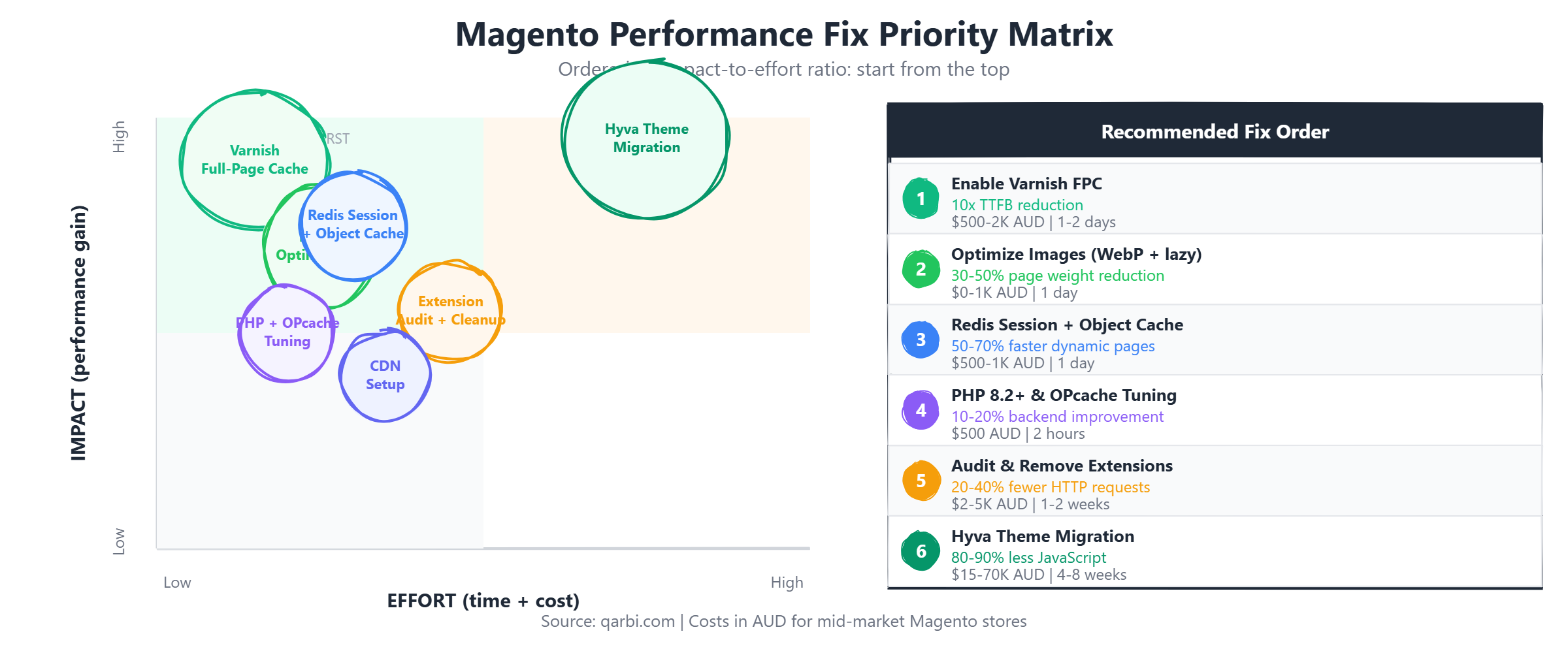
Important: Do not try to fix everything at once. Start with Steps 1 and 2, measure the improvement, then move to Steps 3 and 4. Evaluate Hyva migration after you have addressed the quick wins - you will have better data on whether the frontend is truly your bottleneck.
Measure first. Run Google Lighthouse, WebPageTest, and ideally New Relic or Blackfire to identify your actual bottlenecks before spending money on fixes. The most expensive mistake in performance optimization is fixing the wrong thing.
Frequently Asked Questions
How much does Magento performance optimization cost?
It depends on the scope. Quick wins like Varnish configuration and image optimization typically cost $1,000 to $5,000 AUD. A comprehensive performance overhaul including database optimization, extension cleanup, and hosting migration ranges from $5,000 to $15,000 AUD. A full Hyva theme migration is a larger project at $15,000 to $50,000 AUD depending on store complexity, number of custom modules, and third-party integrations. We offer a free 30-minute performance audit to help you understand which investments will deliver the best ROI for your specific store.
How long does it take to speed up a Magento store?
Quick wins (Varnish, Redis, image optimization) can be implemented in 1-2 weeks and often deliver 40-60% improvement. Database optimization and extension cleanup take 2-4 weeks. A full Hyva migration typically takes 4-12 weeks depending on the number of custom templates, third-party integrations, and checkout customizations. Most stores see the biggest improvement in the first 2 weeks of focused optimization work.
Is Magento slower than Shopify?
Out of the box, yes - Shopify is faster because it is a managed SaaS platform with built-in CDN and optimized infrastructure. However, a properly optimized Magento store with Varnish, Redis, Hyva theme, and good hosting can match or beat Shopify's performance while offering far more flexibility, customization, and control over your data and customer experience. The performance gap is not inherent to Magento - it is a configuration and optimization gap. Magento gives you more rope, which means you can do more with it, but you can also hang yourself if you do not invest in proper setup.
What is a good page load time for an ecommerce store?
For ecommerce, you should target under 2.5 seconds for Largest Contentful Paint (LCP) on both desktop and mobile. For total page load time, under 3 seconds is "good" and under 2 seconds is "excellent." The best-performing ecommerce sites load in 1.0 to 1.5 seconds. For Magento specifically, a well-optimized store on Hyva with Varnish should consistently deliver sub-2-second page loads on desktop and sub-3-second on mobile.
Will upgrading to Adobe Commerce improve performance?
Not automatically. Adobe Commerce (the paid version of Magento) and Magento Open Source share the same core codebase and the same performance characteristics. Adobe Commerce adds features like staging and preview, customer segmentation, and B2B functionality, but these features add complexity rather than speed. The Adobe Commerce Cloud hosting platform does include optimized infrastructure (Fastly CDN, Redis, Elasticsearch), which helps, but you can achieve the same performance on Magento Open Source with equivalent hosting. Upgrading to Adobe Commerce should be driven by feature needs, not performance expectations.
Get Your Free Magento Performance Audit
If your Magento store is loading in more than 3 seconds, you are leaving revenue on the table. The longer you wait, the more you lose - not just in conversions, but in Google rankings as Core Web Vitals become increasingly important for search visibility.
We offer a free 30-minute performance audit for Magento stores. No sales pitch, no obligation. We will run your store through our diagnostic tools, identify the top 3 bottlenecks, and give you a prioritized action plan with estimated costs and expected improvement for each fix.
Whether you need a quick Varnish configuration, an image optimization pass, or a full Hyva migration, our team of certified Magento and Hyva developers can help you get your store to where it needs to be.
Frequently Asked Questions
How much does Magento performance optimization cost?
Quick wins like Varnish and image optimization cost $1,000 - $5,000 AUD. Comprehensive optimization is $5,000 - $15,000 AUD. Full Hyva migration is $15,000 - $50,000 AUD depending on complexity. A free 30-minute audit can identify which investments deliver the best ROI for your store.
How long does it take to speed up a Magento store?
Quick wins (Varnish, Redis, images) take 1-2 weeks for 40-60% improvement. Database and extension cleanup take 2-4 weeks. Full Hyva migration takes 4-12 weeks. Most stores see the biggest gains in the first 2 weeks of focused work.
Is Magento slower than Shopify?
Out of the box, yes. But a properly optimized Magento store with Varnish, Redis, Hyva theme, and good hosting can match or beat Shopify while offering far more flexibility and control. The gap is configuration, not architecture.
What is a good page load time for an ecommerce store?
Target under 2.5 seconds for LCP on desktop and mobile. Under 3 seconds total load time is good, under 2 seconds is excellent. A well-optimized Magento store on Hyva with Varnish should consistently deliver sub-2-second loads on desktop.
Will upgrading to Adobe Commerce improve performance?
Not automatically. Adobe Commerce and Magento Open Source share the same core codebase. Adobe Commerce Cloud includes optimized hosting (Fastly CDN, Redis, Elasticsearch), but you can achieve the same performance on Open Source with equivalent infrastructure.
Ready to fix your store?
Book a free 30-minute audit. We'll review your setup and tell you exactly what we'd do differently.
Book a Free Audit