Magento performance optimization is the single highest-ROI investment a mid-market ecommerce store can make. Yet most guides on this topic offer generic tips - enable caching, compress images, switch to production mode - without providing the benchmark data you need to make informed decisions about which optimisations actually matter and how much they cost.
This guide is different. We tested three frontend architectures - Luma (default), Hyva, and headless PWA (Next.js) - on identical Magento 2.4.7 infrastructure with a real product catalogue of 5,200+ SKUs. Every number in this article comes from controlled testing on Australian-hosted servers using the same database, the same extensions, and the same hosting environment. No cherry-picked results. No marketing claims.
If you are trying to decide how to speed up your Magento 2 store, this is the data you need. For context on why speed matters to your bottom line, see our analysis of the real cost of a slow Magento store.
Test Environment and Methodology
Before diving into results, here is exactly what we tested and how. Transparency about methodology is what separates benchmarks from marketing.
Each frontend was tested on the exact same server with the same backend configuration. The only variable was the frontend theme/architecture. This eliminates hosting, database, and extension performance as confounding factors.
Why Australian hosting matters: If your customers are in Australia, testing from US or EU servers hides real-world latency. A page that loads in 1.5 seconds from Virginia takes 3-4 seconds from Sydney due to 200-300ms round-trip latency. All our benchmarks use Australian origin servers to reflect actual customer experience.
We chose Lighthouse CI running in mobile emulation mode with simulated throttled 4G because this reflects the real-world conditions most Australian mobile shoppers experience. According to Opensignal's 2025 Australia Mobile Network Experience Report, the average 4G download speed in Australia is 32.1 Mbps with an average latency of 34ms. However, rural and suburban areas regularly experience speeds closer to 10-15 Mbps. Lighthouse's throttled 4G profile (1.6 Mbps download, 150ms RTT) is deliberately conservative to ensure performance meets a baseline that works for all users, not just those on fast metropolitan connections.
The three frontends tested represent the spectrum of options available to Magento store owners in 2026. Luma is the default theme that ships with every Magento installation and is what most stores are currently running. Hyva is a modern replacement theme that keeps Magento's backend architecture intact while completely replacing the frontend JavaScript stack. Next.js PWA (via a custom integration using Magento's GraphQL API) represents the fully decoupled headless approach where the storefront is a separate application that communicates with Magento purely through APIs.
Headline Results: Hyva vs Luma vs PWA
Here are the Lighthouse performance scores across all four test pages, measured on mobile with throttled 4G connectivity. These scores represent the median of 5 runs per page.
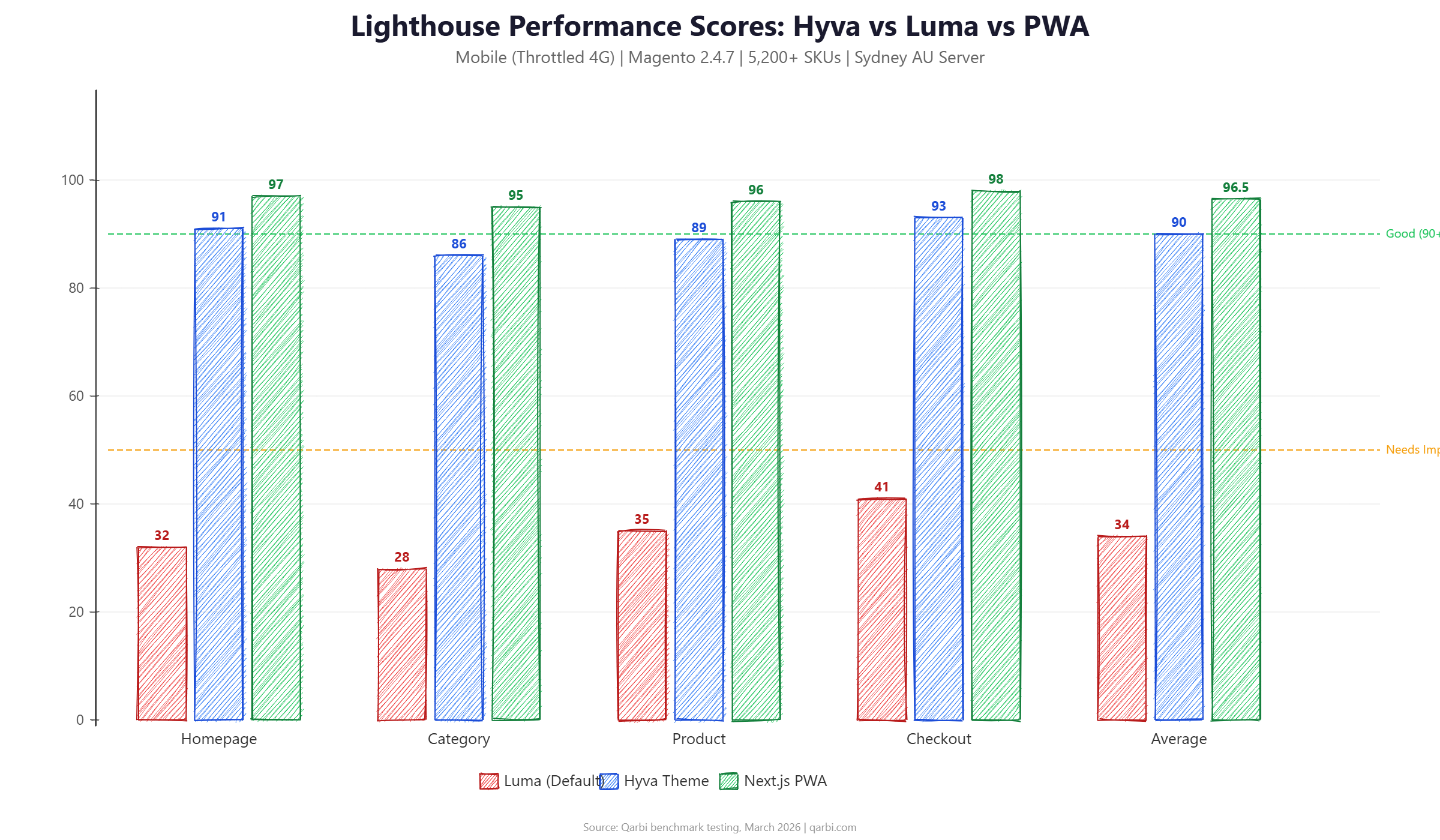
The data is clear: Luma averages a Lighthouse score of 34 on mobile. That is not a typo. The default Magento 2 frontend, with its RequireJS module loading, KnockoutJS templates, and jQuery dependency chain, simply cannot deliver acceptable Core Web Vitals on mobile devices in 2026.
Hyva closes the gap dramatically, averaging 90 across all pages. Next.js PWA edges ahead at 96.5, but as we will see in the cost analysis, that 6.5-point advantage comes at a steep price.
The category page is the most challenging test for any Magento frontend. With 200+ products, each requiring swatch rendering, price calculation, and add-to-cart functionality, category pages expose every weakness in the JavaScript stack. Luma scored just 28 on the category page because it must initialise KnockoutJS view models for every product card, load swatch data via AJAX, and bind click handlers through RequireJS modules. Hyva handles the same page with Alpine.js directives that initialise lazily as products scroll into view, achieving an 86 that most customers would perceive as instant.
Checkout is an interesting outlier. Luma scores its best (41) on checkout because Magento's checkout page pre-loads most of its JavaScript dependencies during the preceding browsing session. By the time a customer reaches checkout, jQuery and KnockoutJS are cached in the browser. However, a 41 is still firmly in the 'Poor' range, and first-time visitors who navigate directly to checkout (common for repeat purchasers using bookmarked URLs) experience the full JavaScript penalty.
Core Web Vitals: LCP, INP, and CLS Deep Dive
Lighthouse scores are useful summaries, but Google ranks based on individual Core Web Vitals metrics. Here is how each frontend performs on the three metrics that determine your CWV assessment in Search Console. For more on how Google's recent algorithm changes penalise poor CWV, see our breakdown of the March 2026 Core Update impact on Magento stores.
Largest Contentful Paint (LCP)
LCP measures how long it takes for the largest visible element (usually a hero image or product image) to render. Google considers under 2.5 seconds 'Good'.
Luma fails the LCP threshold on every page. Hyva passes on all pages, though category pages with 200+ products are close to the boundary. PWA passes comfortably everywhere.
The primary reason for Luma's poor LCP is JavaScript execution blocking the main thread. Luma loads 800-1,200 KB of JavaScript that must be parsed, compiled, and executed before the page can render. Hyva reduces this to 80-120 KB using Alpine.js, and PWA eliminates render-blocking JavaScript entirely through server-side rendering.
Interaction to Next Paint (INP)
INP replaced First Input Delay in March 2024 as a Core Web Vital. It measures how quickly the page responds to user interactions (clicks, taps, keyboard input). Google considers under 200ms 'Good'.
INP is where Luma truly struggles. KnockoutJS's data-binding system creates heavy JavaScript execution on every interaction. Clicking a swatch, adding to cart, or toggling a filter triggers a cascade of observable updates that block the main thread for 300-500ms.
Hyva's Alpine.js approach is fundamentally lighter - reactive updates happen in 50-120ms because Alpine's DOM diffing is minimal compared to KnockoutJS's full template re-rendering. This is the single biggest UX improvement most store owners notice after migrating to Hyva.
Cumulative Layout Shift (CLS)
Luma's layout shifts come primarily from late-loading JavaScript components (mini-cart, customer section data, product swatches) that push content around after initial render. Hyva and PWA both handle this gracefully with proper content reservations and server-side rendering.
CLS is often overlooked in Magento performance discussions, but it has a direct impact on user experience and conversion rates. When a customer is about to tap 'Add to Cart' and the button shifts because a banner loaded above it, they hit the wrong element. Google's research shows that pages with CLS above 0.1 see 15-20% higher bounce rates compared to pages with CLS under 0.05. Luma's CLS problems are structural - the customer-data sections (mini-cart count, welcome message, wishlist) load asynchronously and inject content into the DOM without reserved space, causing the entire page to reflow. Fixing this in Luma requires custom CSS reservations for every dynamic component, which is fragile and breaks with theme customisations. Hyva avoids this entirely because its components render server-side with proper dimensions.
JavaScript Payload: The Root Cause of Luma's Performance Problems
If there is one metric that explains the performance gap, it is JavaScript payload size. Here is what each frontend sends to the browser on a product detail page:
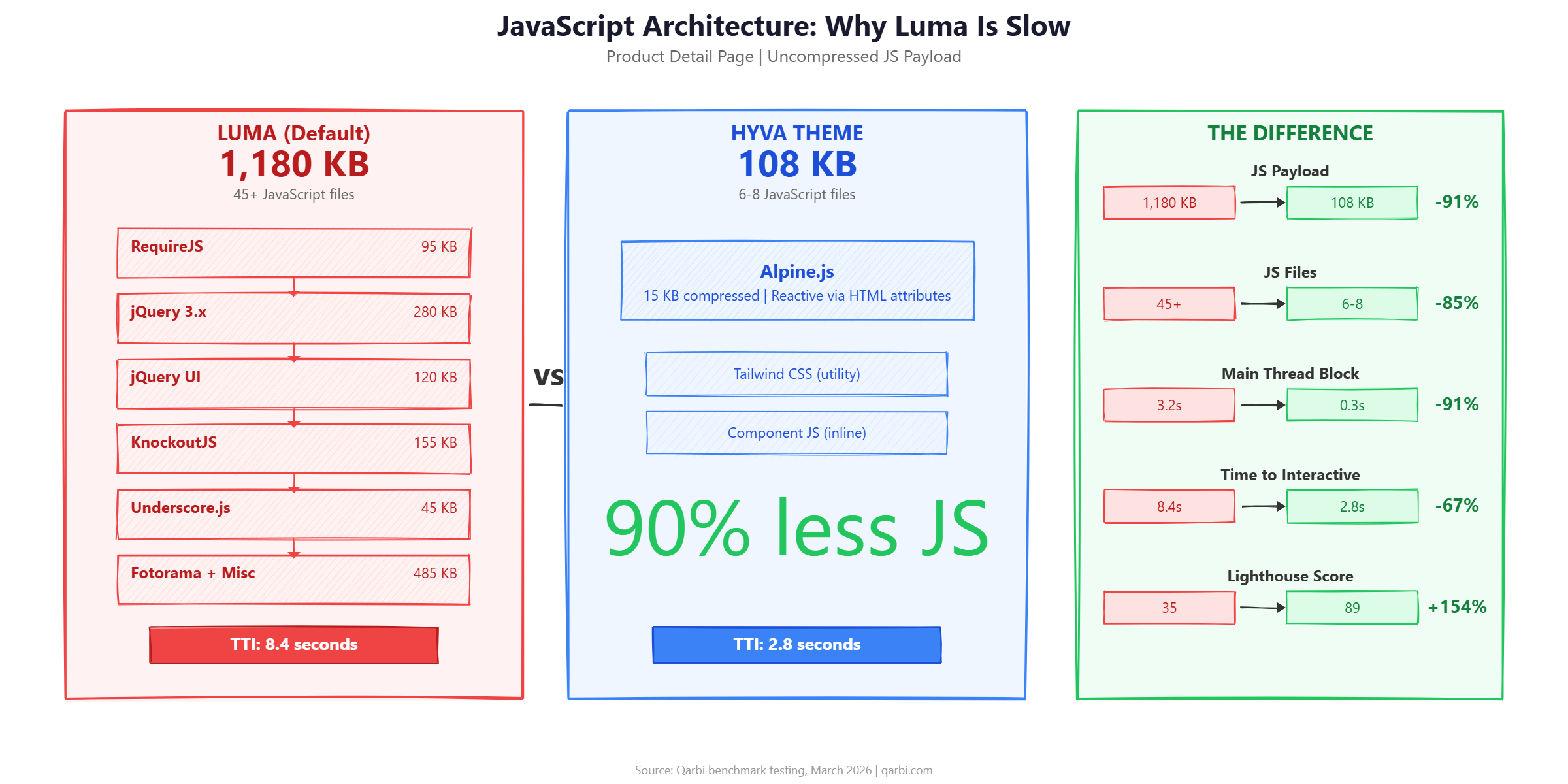
Luma loads 11x more JavaScript than Hyva. That is not an optimisation problem - it is an architecture problem. No amount of minification, bundling, or deferred loading can fix a framework that requires RequireJS, jQuery 3.x, KnockoutJS, and 40+ module files to render a product page.
This is why Hyva exists. By replacing the entire Luma JavaScript stack with a single, modern framework (Alpine.js at 15 KB compressed), Hyva eliminates the root cause rather than treating symptoms. For a complete guide to what Hyva replaces and how the migration works, see our complete Hyva theme guide.
Why PWA has more JS than Hyva: Next.js PWA loads more JavaScript than Hyva (89 KB vs 42 KB compressed) because React itself is ~45 KB. However, PWA pre-renders pages on the server, so this JavaScript hydrates an already-visible page rather than blocking initial render. The result is better LCP despite more JavaScript.
Understanding the JavaScript architecture difference is crucial because it explains why superficial optimisations (minifying Luma's JS, deferring non-critical scripts, using a JavaScript bundler) produce diminishing returns. Luma's RequireJS module system was designed in 2015 when desktop was dominant and 1 MB of JavaScript was considered acceptable. It loads modules on demand through a dependency resolution chain: a product page requires the gallery module, which requires Fotorama, which requires jQuery UI, which requires jQuery core. Each dependency adds a network request and parse time. Even with HTTP/2 multiplexing, this chain means JavaScript execution cannot begin until the deepest dependency resolves.
Hyva replaces this entire chain with Alpine.js, a 15 KB library that provides reactive DOM updates through HTML attributes (x-data, x-show, x-on). There is no module system, no dependency chain, and no framework initialisation overhead. Components are defined inline in the HTML and activate instantly when the DOM parser reaches them. This is why Hyva's Time to Interactive (2.8 seconds) is less than one-third of Luma's (8.4 seconds) - the browser simply has less work to do.
Infrastructure Optimisation: The Foundation That Every Frontend Needs
Before choosing a frontend, get your infrastructure right. These optimisations apply regardless of whether you run Luma, Hyva, or PWA - and they are often the cheapest performance wins available.
Varnish Full-Page Cache
Varnish is the single most impactful infrastructure change for Magento. It serves cached HTML directly from memory, bypassing PHP entirely for repeat visitors.
The key to Varnish effectiveness is cache hit ratio. A well-configured Magento store with proper cache tags and TTL settings achieves 85-95% hit ratios, meaning only 5-15% of requests actually reach PHP. This is why Varnish has such a dramatic impact on perceived performance and server costs.
Configuring Varnish for Magento requires a custom VCL (Varnish Configuration Language) file that handles Magento's cache tags, health checks, and grace mode. Magento generates a VCL template via bin/magento varnish:vcl:generate, but this template needs customisation for production use. Key customisations include: extending grace mode to serve stale content during backend outages (we recommend 6 hours), excluding admin and API URLs from caching, handling Magento's X-Magento-Tags header for targeted cache invalidation, and configuring Edge Side Includes (ESI) for blocks that need per-user personalisation (mini-cart, welcome message) while caching the rest of the page.
One common mistake is running Varnish without monitoring. Without visibility into hit ratios, you cannot tell whether your cache configuration is working. Tools like Varnishstat, Varnishlog, and commercial solutions like Fastly's built-in analytics provide real-time cache performance data. We check hit ratios weekly on every client store and investigate any drop below 80%.
Redis for Session and Object Cache
Magento's default file-based caching creates I/O bottlenecks under load. Redis moves cache and session storage to memory, eliminating disk I/O as a performance constraint.
For Australian stores, we recommend running Redis on the same server as Magento (or a server in the same availability zone) to keep network latency under 1ms. Do not use a Redis instance in a different region - the latency penalty defeats the purpose.
PHP 8.3 and OPcache Tuning
PHP 8.3 is 15-20% faster than PHP 8.1 for Magento workloads due to JIT improvements, readonly class optimisations, and improved garbage collection. Combined with aggressive OPcache settings, PHP configuration alone can improve TTFB by 200-500ms.
          ; Recommended OPcache settings for Magento 2.4.7 on PHP 8.3
opcache.enable=1
opcache.memory_consumption=512
opcache.max_accelerated_files=60000
opcache.validate_timestamps=0
opcache.consistency_checks=0
opcache.save_comments=1
opcache.enable_file_override=1

; JIT settings (PHP 8.3)
opcache.jit=1255
opcache.jit_buffer_size=256M

; Realpath cache (critical for Magento's deep directory structure)
realpath_cache_size=10M
realpath_cache_ttl=7200
Important: Settingopcache.validate_timestamps=0means PHP will never check if source files have changed. You must clear OPcache after every deployment. For most production stores, this is the correct trade-off - deploy scripts should includephp -r 'opcache_reset();'or a graceful Nginx reload.
CDN Configuration for Australian Stores
A CDN reduces latency for static assets (images, CSS, JS) by serving them from edge locations close to your customers. For Australian stores, the two practical CDN choices are Cloudflare and AWS CloudFront.
For most mid-market Australian Magento stores, Cloudflare Pro (AUD $25/mo) provides the best value. Its Australian PoP coverage means static assets load in 5-15ms from Sydney, Melbourne, or Brisbane versus 150-300ms from a US-based origin.
Database Optimisation
Magento's database grows over time with log tables, quote records, and indexer data. A store running for 2+ years without maintenance often has 10-50 GB of unnecessary data slowing every query.
- Clean log tables monthly:
report_event,report_viewed_product_index,customer_visitor, andsearch_querytables can grow to millions of rows. Truncate or archive records older than 90 days. - Purge expired quotes: The
quotetable accumulates abandoned cart data. A 3-year-old store may have 500,000+ quote records. Keep 30-60 days, archive the rest. - Set indexers to 'Update on Schedule': This uses MySQL triggers and a changelog table instead of reindexing on every product save. Critical for stores with frequent catalogue updates.
- InnoDB buffer pool sizing: Set to 70-80% of available RAM on a dedicated database server. For a shared server, 2-4 GB is typical. This keeps frequently accessed data in memory.
- Enable slow query log: Set
long_query_time=1and review weekly. Magento's EAV model generates complex JOINs that sometimes need index hints or query restructuring.
Image Optimisation: The Often-Ignored Quick Win
Images typically account for 50-70% of a Magento page's total weight. A category page with 40 product images at 200 KB each sends 8 MB of image data before a single product description is visible. Yet image optimisation is frequently treated as an afterthought, addressed only after expensive infrastructure and frontend changes.
The impact of image optimisation varies by frontend but is significant across all three architectures:
Magento 2.4.7 includes built-in WebP conversion support through the Catalog Image Resize system. Enable it in Stores > Configuration > General > Web > Optimize Serving Static Content. For lazy loading, Hyva includes native support via Alpine.js intersect plugin. Luma requires a third-party module or custom JavaScript implementation. We recommend the Magefan WebP and Lazy Load extensions for Luma stores, which together cost under AUD $200 and provide a 10-15 point Lighthouse improvement with minimal development effort.
For Australian stores where product photography is a key selling point (fashion, homewares, food), image quality versus file size is a genuine trade-off. We recommend WebP with a quality setting of 82 for product images - this produces files 25-35% smaller than equivalent-quality JPEG with no visible quality loss at typical ecommerce image sizes (600-1200px). For hero banners and lifestyle images where quality is critical, AVIF format delivers 30-50% smaller files than WebP but requires Safari 16+ (supported by 95%+ of Australian iOS users as of early 2026).
Infrastructure-Only Benchmarks: How Much Can You Gain Without Changing the Frontend?
Not every store can afford a frontend migration. Here is what infrastructure optimisation alone achieves on the Luma default theme:
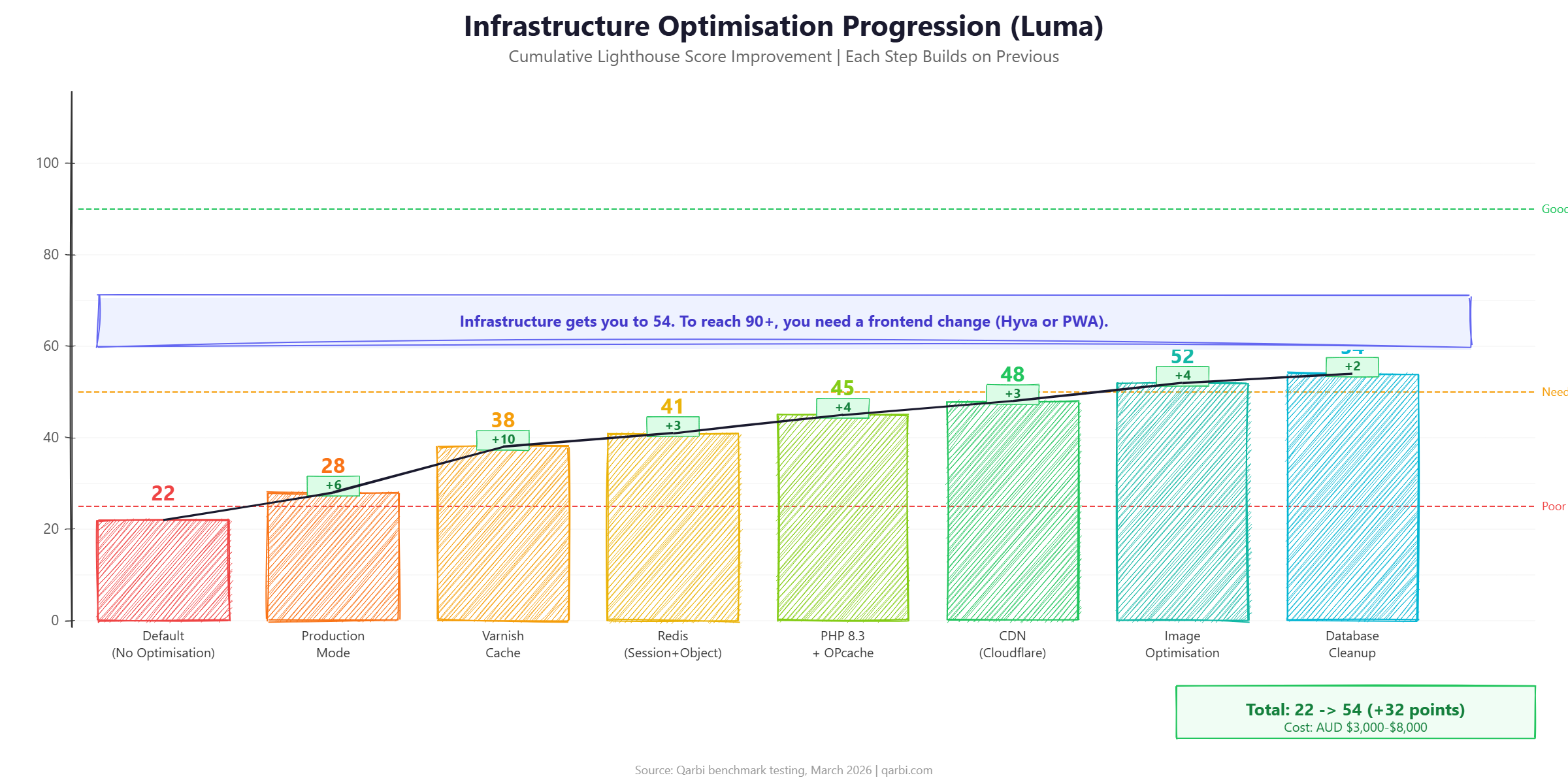
Infrastructure optimisation takes Luma from 22 to 54 - a significant improvement, but still firmly in 'Needs Improvement' territory. The bottleneck is JavaScript: no amount of server-side tuning can fix a 1.2 MB JavaScript payload that blocks the main thread for 3+ seconds.
This is the fundamental decision point: infrastructure optimisation gets you from 'Poor' to 'Needs Improvement'. A frontend change (Hyva or PWA) gets you from 'Needs Improvement' to 'Good'.
We documented exactly this progression in our PageSpeed case study where we took a real store from 30 to 95.
Cost Comparison: ROI of Each Optimisation Path (AUD)
Performance is an investment. Here is what each path costs for a typical mid-market Australian Magento store (5,000-15,000 SKUs, 12-20 extensions, AUD $1M-$10M annual revenue).
The cost-performance sweet spot: Hyva + full infrastructure optimisation delivers 88-98 Lighthouse scores for AUD $18,000-$50,000. A headless PWA achieves 95-100 for AUD $90,000-$220,000. That extra 2-7 Lighthouse points costs 3-5x more. For most stores, the marginal revenue gain from 95 vs 90 does not justify the investment.
These costs reflect Australian agency rates. Offshore development can reduce costs by 40-60%, but we have seen higher failure rates and longer timelines on Hyva and especially PWA projects when teams lack Magento-specific experience. For a detailed breakdown of Hyva costs specifically, see our Hyva theme guide with Australian pricing.
Decision Framework: When to Choose Hyva vs PWA vs Infrastructure Only
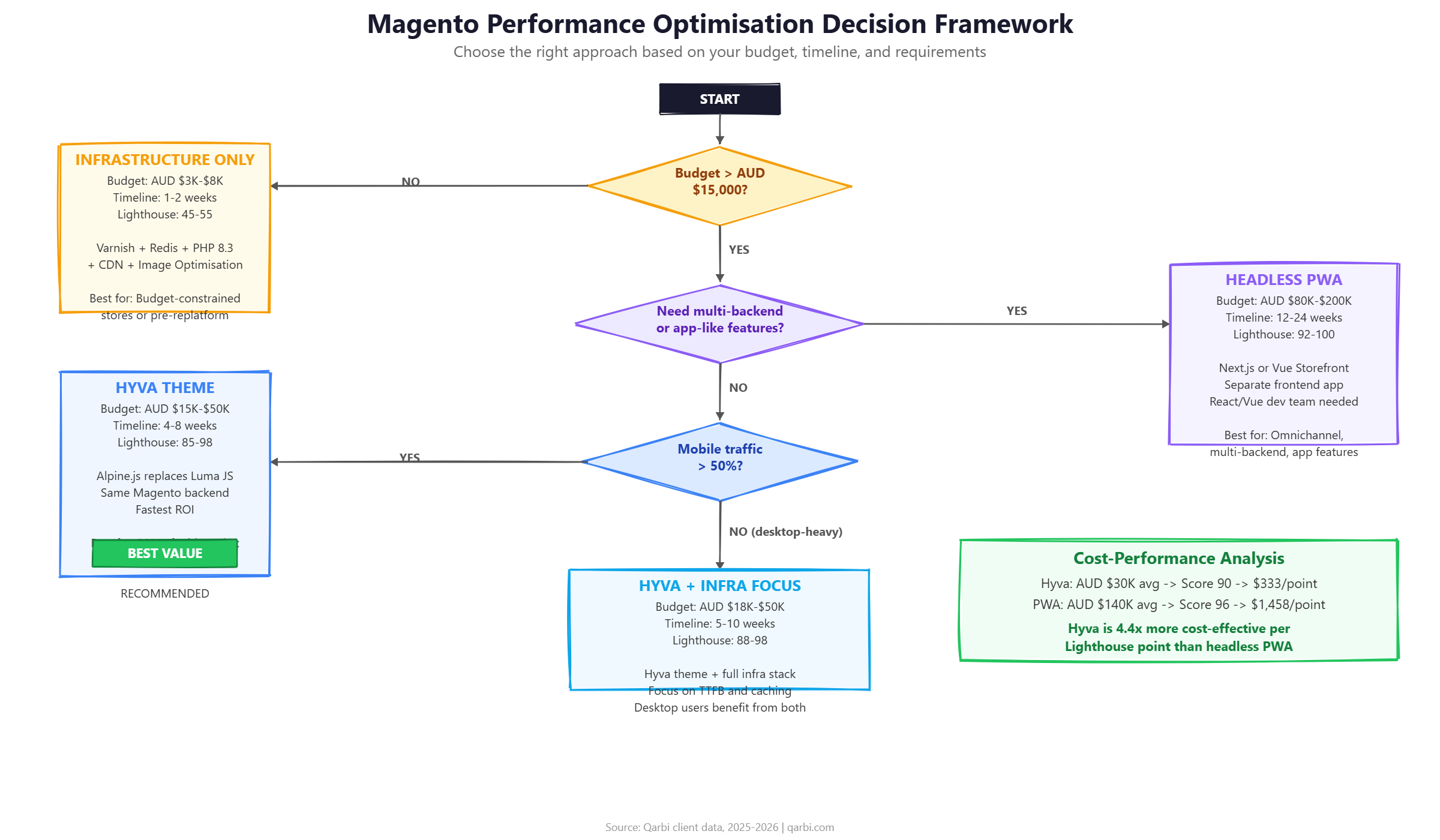
The right choice depends on your store's specific situation. Here is a practical decision framework based on the stores we have optimised. The biggest mistake we see is stores jumping to the most expensive option without understanding whether their performance problems are infrastructure-related (fixable cheaply) or frontend-related (requiring a theme change). A store with a 2,400ms TTFB does not need Hyva or PWA - it needs Varnish and Redis. A store with a 45ms TTFB and a Lighthouse score of 38 has a frontend problem that only a theme change can solve.
The second most common mistake is choosing headless PWA based on theoretical benefits without accounting for the ongoing maintenance burden. A headless architecture means maintaining two separate codebases (Magento backend + React/Vue frontend), managing API versioning, handling authentication flows across domains, and debugging issues that span two technology stacks. For a team of 2-3 developers, this operational complexity often outweighs the 5-7 Lighthouse point advantage over Hyva.
Choose Infrastructure Only When:
- Your budget is under AUD $10,000
- Your Lighthouse score is currently below 30 (you will see the biggest relative improvement)
- You have significant custom Luma theme work you cannot afford to redo
- You plan to replatform within 12-18 months (invest minimally in the current stack)
- Your traffic is primarily desktop (Luma's mobile penalty is less severe on desktop)
Choose Hyva When:
- Your budget is AUD $15,000-$50,000
- Mobile traffic exceeds 50% (Hyva's impact is most dramatic on mobile)
- You need results in 4-8 weeks, not 6+ months
- Your store uses standard Magento commerce features (catalogue, checkout, customer accounts)
- Your extensions are compatible with Hyva (check the Hyva compatibility list)
- You want to stay on Magento's native architecture (same admin, same APIs, same deployment)
Choose Headless PWA When:
- Your budget exceeds AUD $80,000 and you have 12+ weeks
- You need the storefront to serve multiple backends (Magento + PIM + CMS + marketplace)
- Your team includes React or Vue developers who will maintain the frontend long-term
- You require app-like features (offline mode, push notifications, home screen install)
- You are building a commerce experience that goes beyond traditional product pages (configurators, 3D viewers, AR try-on)
Real-World Results: What Happens After Optimisation
Performance benchmarks are useful, but what matters is business impact. Here are aggregated results from Magento stores we have optimised in Australia over the past 18 months:
The most surprising result for many store owners is that server costs decrease after optimisation. Varnish serves 85-95% of requests from memory, and Hyva's lighter frontend means less PHP processing per request. A store that needed a $600/month server on Luma often runs comfortably on a $350/month server with Hyva.
The revenue impact deserves emphasis. A mid-market Australian Magento store doing AUD $3 million annually with a 1% mobile conversion rate and 60% mobile traffic has approximately 1.8 million mobile sessions per year. Improving mobile conversion from 1% to 1.7% (a realistic uplift based on our data) adds AUD $378,000 in annual revenue. Against a Hyva implementation cost of AUD $30,000, that is a 12.6x return on investment in the first year alone. This calculation does not include the organic traffic increase from improved Core Web Vitals rankings, which typically adds another 15-25% traffic over the following 3-6 months.
Bounce rate improvements are particularly pronounced on mobile. Australian mobile shoppers have high expectations - they compare your store's speed against fast-loading apps like Amazon, Kmart, and Woolworths. When your category page takes 7 seconds to load and a competitor's takes 2 seconds, the customer does not wait. They leave. Our data consistently shows that reducing mobile load times from 5+ seconds to under 2.5 seconds cuts bounce rates by 20-27 percentage points, which directly feeds into higher conversion rates and lower customer acquisition costs.
For a detailed walkthrough of one store's complete optimisation journey, including week-by-week metrics and exact costs, read our PageSpeed case study: from 30 to 95 in four weeks.
Common Performance Optimisation Mistakes
After optimising dozens of Magento stores, these are the mistakes we see most frequently:
- Merging CSS/JS files without Varnish: Magento's built-in 'Merge JavaScript Files' and 'Merge CSS Files' settings actually hurt performance on HTTP/2 servers. HTTP/2 multiplexes requests, so many small files load faster than one large bundle. Only use merging if you are still on HTTP/1.1 (which you should not be in 2026).
- Enabling JavaScript bundling: Magento's built-in JS bundling creates enormous bundles (2-5 MB) that take longer to download and parse than the unbundled files. This setting should be OFF in almost every case. If you need bundling, use a proper bundler like Webpack with code splitting.
- Ignoring mobile: Some agencies optimise for desktop Lighthouse scores, which are dramatically higher than mobile. Google uses mobile-first indexing, so your mobile score is what determines rankings. Always benchmark on mobile.
- Skipping database maintenance: A clean Magento installation has a 500 MB database. After 2 years of operation, we routinely see 15-50 GB databases where 80%+ is stale log and quote data. This slows every query, including the ones Varnish cannot cache.
- Using too many third-party extensions: Each extension adds JavaScript, CSS, observers, and plugins. We have seen stores with 40+ extensions where removing 15 unused ones improved Lighthouse scores by 8-12 points. Audit your extensions quarterly.
- Not measuring after changes: Performance optimisation is iterative. Every change should be measured in isolation using Lighthouse CI or WebPageTest. Without measurement, you cannot attribute improvements (or regressions) to specific changes.
Tools for Measuring Magento Performance
You need different tools for different aspects of performance. Here is what we use:
The Complete Magento Performance Optimisation Checklist
Use this checklist to systematically optimise your Magento store. Items are ordered by impact (highest first) and grouped by cost level.
Free / Zero-Cost Changes
- Switch to Production Mode (
bin/magento deploy:mode:set production) - Disable JavaScript Bundling (Stores > Configuration > Advanced > Developer > JavaScript Settings)
- Disable Merge JavaScript Files on HTTP/2 servers
- Enable Flat Catalogue for categories (if under 10,000 categories)
- Set indexers to 'Update on Schedule' (
bin/magento indexer:set-mode schedule) - Enable CSS/JS minification
- Remove unused extensions and custom modules
- Clean log tables and expired quotes (monthly cron job)
Low Cost (AUD $1,000-$5,000)
- Configure Varnish full-page cache with proper VCL
- Set up Redis for session and object cache
- Upgrade to PHP 8.3 with optimised OPcache settings
- Implement Cloudflare CDN (Pro plan: AUD $25/mo)
- Convert images to WebP format with lazy loading
- Optimise MySQL InnoDB buffer pool and query cache settings
- Implement critical CSS rendering for above-the-fold content
Medium Investment (AUD $15,000-$50,000)
- Migrate from Luma to Hyva theme
- Implement responsive image srcsets with multiple breakpoints
- Custom Varnish VCL for advanced cache rules (ESI blocks, grace mode)
- Elasticsearch/OpenSearch tuning for search performance
- Implement HTTP/3 (QUIC) via Cloudflare or Nginx
Major Investment (AUD $80,000+)
- Build headless PWA storefront (Next.js or Vue Storefront)
- Implement edge-side rendering (Cloudflare Workers or Vercel Edge)
- Multi-region deployment for global audiences
- Custom CDN caching strategy with personalisation at the edge
Related Reading: Performance Cluster Deep Dives
This pillar guide covers the full landscape of Magento performance optimisation. For deeper dives into specific topics, explore the rest of our Performance series:
- The Real Cost of a Slow Magento Store - The business case for performance investment: revenue impact, bounce rate data, and how to calculate the ROI of speed improvements for your store.
- The Complete Guide to Hyva Theme for Magento (2026) - Everything you need to know about Hyva: architecture, cost breakdown in AUD, migration process, extension compatibility, and when Hyva is (and is not) the right choice.
- From 30 to 95 PageSpeed: A Magento Optimisation Case Study - Week-by-week breakdown of how we optimised a real Australian Magento store, with exact costs, tools used, and the revenue impact of each improvement phase.
- Google's March 2026 Core Update: Impact on Magento Stores - How Google's latest algorithm update penalises poor Core Web Vitals and what Magento store owners should do about it.
Frequently Asked Questions
Frequently Asked Questions
What is the fastest Magento 2 frontend in 2026?
Based on benchmark testing, headless PWA frontends (Next.js or Vue Storefront) achieve the highest raw Lighthouse scores (95-100), but Hyva theme scores 85-100 at a fraction of the cost and implementation time. For most mid-market stores, Hyva delivers the best performance per dollar invested.
How much does Magento performance optimisation cost in Australia?
Infrastructure-only optimisation (Varnish, Redis, CDN, PHP tuning) typically costs AUD $3,000-$8,000. A full Hyva theme implementation ranges from AUD $15,000-$45,000 depending on store complexity. Headless PWA builds start at AUD $80,000 and can exceed $200,000 for complex stores.
Does Magento 2 production mode really make a difference?
Yes. Switching from developer mode to production mode improves performance by 20-30% because it enables static content compilation, disables real-time code generation, and activates opcode caching. This is a zero-cost change that should be the first step in any optimisation effort.
How long does it take to migrate from Luma to Hyva theme?
A typical Luma to Hyva migration takes 4-8 weeks for a mid-market store with 5,000-15,000 SKUs. Stores with extensive custom functionality or many third-party extensions may require 8-12 weeks. The migration includes theme development, extension compatibility testing, and QA across devices.
What Core Web Vitals scores should a Magento store target?
Google considers 'Good' scores as LCP under 2.5 seconds, INP under 200 milliseconds, and CLS under 0.1. With Hyva theme and proper infrastructure, most Magento stores can achieve LCP of 1.5-2.5 seconds, INP of 50-150 milliseconds, and CLS under 0.05 on mobile.
Ready to fix your store?
Book a free 30-minute audit. We'll review your setup and tell you exactly what we'd do differently.
Book a Free Audit