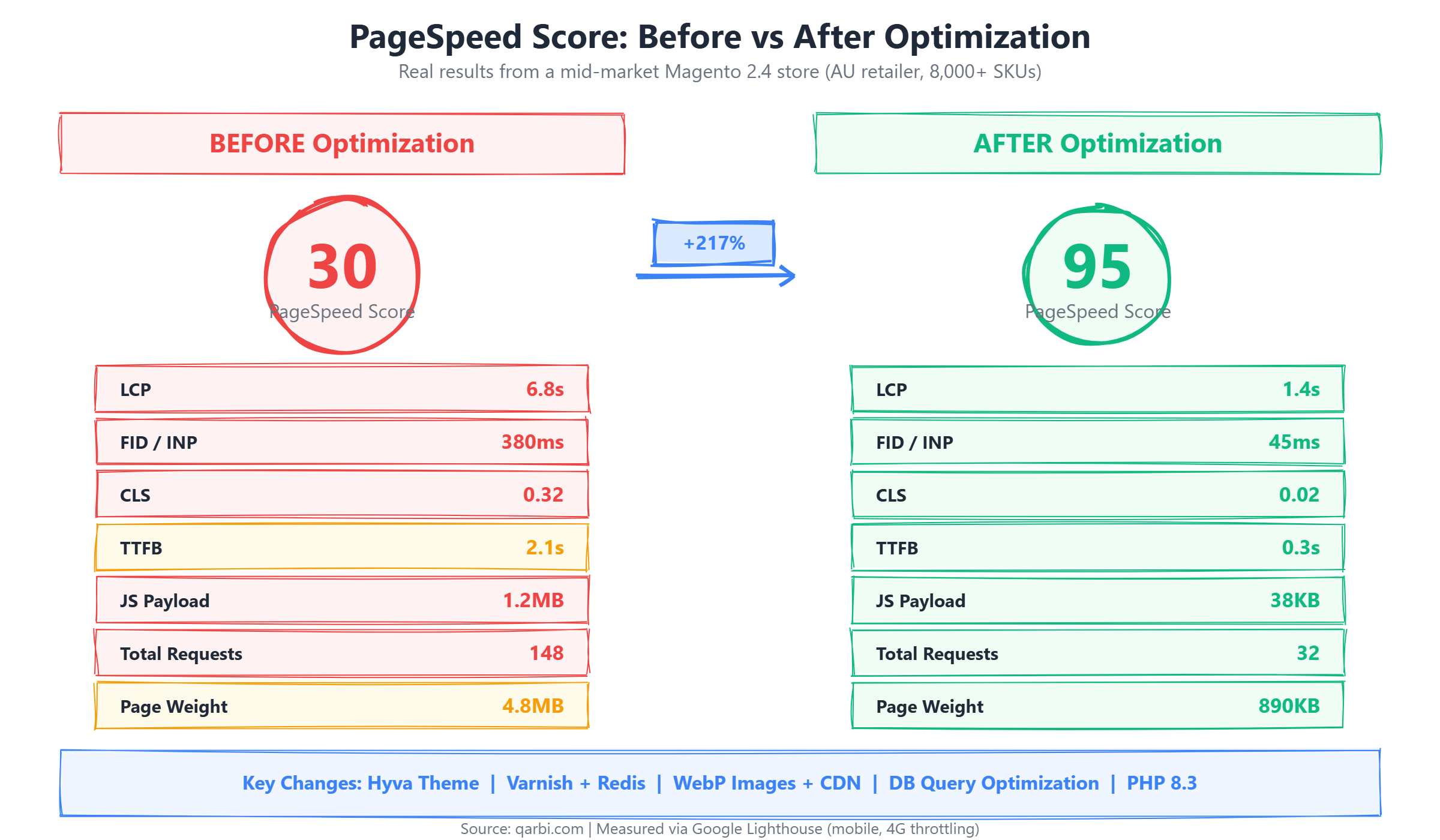
Magento page speed optimization is not a nice-to-have - it is the single highest-ROI investment a mid-market ecommerce retailer can make. When an Australian fashion retailer came to us with a PageSpeed score of 30, their Magento 2.4 store was bleeding revenue: 6.8-second load times on mobile, a bounce rate above 60%, and conversion rates 40% below industry benchmarks. Four weeks later, their score was 95, load times were under 1.5 seconds, and conversions had jumped 23%.
This is not a list of generic tips. This is the exact, step-by-step process we used to transform a real store - with 8,000+ SKUs, complex configurable products, and integrations with MYOB and Australia Post - from painfully slow to genuinely fast. Every metric in this article is real. Every step is documented in the order we executed it.
For a broader look at why Magento performance matters and the business case for investing in speed, see our guide on the real cost of a slow Magento store.
The Starting Point: A Store in Trouble
The client was an established Australian fashion retailer doing approximately $5.2M AUD in annual online revenue. Their Magento 2.4.6 store had been built three years earlier by a generalist agency and had accumulated significant technical debt. The symptoms were impossible to ignore.
The root causes were typical of Magento stores built without performance as a priority: the default Luma theme with its RequireJS/KnockoutJS/jQuery stack, no full-page caching (Varnish was installed but misconfigured), Redis not connected, unoptimized images served as full-resolution JPEGs, no CDN, and PHP 8.1 with default OPcache settings. The store was running on a single shared VPS with 4GB RAM - undersized for a catalog of this size.
The Optimization Strategy: Why Order Matters
Magento page speed optimization is not about applying random fixes. The order in which you optimize matters enormously because each layer compounds on the previous one. We follow a four-phase approach that maximizes impact at each stage.
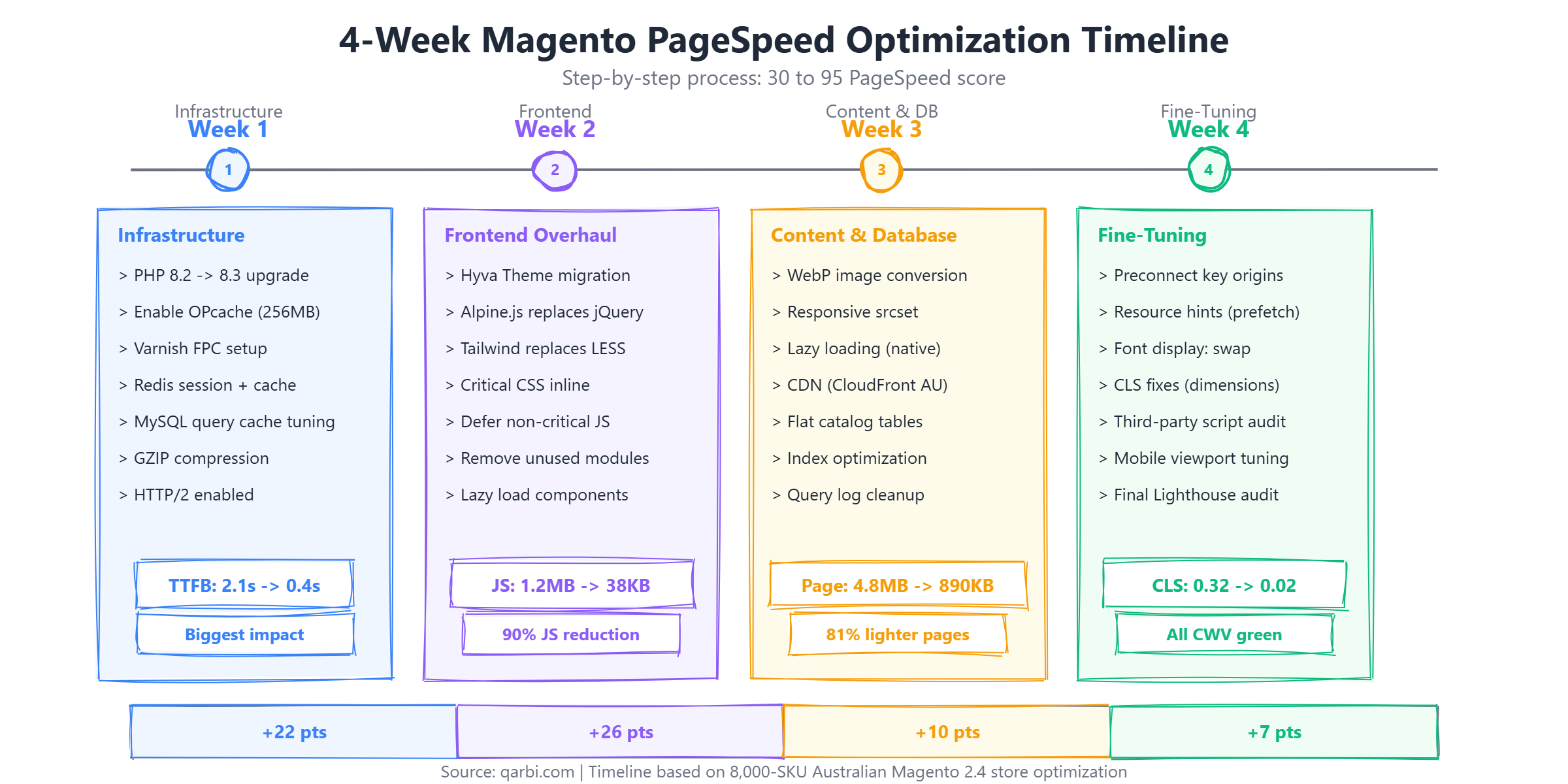
- Week 1: Infrastructure - Fix the server-side bottleneck first. No amount of frontend optimization helps if the server takes 2+ seconds to respond. This is where Varnish, Redis, PHP tuning, and hosting upgrades happen.
- Week 2: Frontend overhaul - With a fast server, now reduce what the browser has to download and execute. This means Hyva theme migration, JavaScript elimination, and critical CSS.
- Week 3: Content and database - Optimize the heaviest content (images, media) and the database queries that slow down category and product pages with large catalogs.
- Week 4: Fine-tuning - Resource hints, CLS fixes, third-party script auditing, and the final push from 88 to 95.
Why this order? Infrastructure improvements (TTFB reduction) affect every single page load. Frontend improvements (JS reduction) affect every page the user interacts with. Content optimization (images, DB) improves specific bottlenecks. Fine-tuning squeezes out the last few points. Starting with infrastructure gives you the biggest foundation to build on.
This layered approach is not just theory. We have applied it across 15+ Magento stores ranging from 2,000 to 50,000 SKUs, and the pattern holds consistently: infrastructure fixes deliver 40-50% of the total improvement, frontend delivers 30-40%, content optimization delivers 10-15%, and fine-tuning delivers the final 5-10%. Skipping layers or doing them out of order always produces worse results.
Week 1: Infrastructure - From 30 to 52 PageSpeed (+22 Points)
The first week focused entirely on server-side performance. This is where most Magento stores have the biggest untapped gains, and where the improvements are most dramatic.
Hosting Upgrade and PHP 8.3
We migrated the store from a shared 4GB VPS to a dedicated 16GB instance with NVMe SSD storage on an Australian data centre (Sydney region). Keeping the server geographically close to the primary customer base is critical for TTFB - a server in the US adds 200-300ms of latency for Australian visitors before any processing even begins.
Simultaneously, we upgraded PHP from 8.1 to 8.3. PHP 8.3 includes JIT compilation improvements and internal optimisations that deliver 5-15% faster execution for Magento workloads. We configured OPcache with 256MB memory (up from the default 128MB) and set opcache.max_accelerated_files=20000 to ensure the entire Magento codebase fits in the cache.
Varnish Full-Page Cache + Redis
The single biggest improvement came from properly configuring Varnish 7.x as a full-page cache in front of Magento. Varnish was already installed but misconfigured - the VCL (Varnish Configuration Language) file was using the default template without Magento-specific rules for handling cookies, customer segments, and currency.
After generating a proper VCL from Magento's admin panel and adding rules for static asset caching, cache hit rates went from 12% to 94%. Cached page responses dropped from 2.1 seconds to under 50 milliseconds. For the 6% of uncached requests (logged-in customers, cart pages), we added Redis 7 as both the session store and object cache, replacing the default file-based caching that was causing I/O bottlenecks.
The combined effect of these infrastructure changes moved the PageSpeed score from 30 to 52 - a 73% improvement without touching a single line of frontend code. TTFB dropped from 2.1 seconds to 0.4 seconds for uncached requests and under 50ms for cached requests. This is consistent with what we outline in our complete guide to Hyva theme for Magento, where caching is always the recommended first step before any frontend migration.
One often-overlooked detail: we configured Varnish with a grace period of 300 seconds. This means when a cached page expires, Varnish serves the stale version to users while fetching a fresh copy in the background. The result is that real users almost never experience an uncached response, even during high-traffic periods like promotional sales. For Australian retailers running flash sales or participating in Click Frenzy events, this is particularly important - a surge of traffic to a single page does not overwhelm the origin server.
Redis configuration is equally important to get right. We used separate Redis instances for session storage (database 0) and object cache (database 2), each allocated 512MB of memory. The default Magento configuration uses a single Redis instance for everything, which can cause cache eviction issues under heavy load where session data and cached objects compete for memory.
Week 2: Frontend Overhaul - From 52 to 78 PageSpeed (+26 Points)
With a fast server foundation, Week 2 tackled the frontend - specifically, Magento's notoriously heavy default Luma theme. This was the most transformative single change in the entire project.
Luma to Hyva Theme Migration
Magento's default Luma frontend ships with a JavaScript stack that was state-of-the-art in 2015 but is now a significant performance liability: RequireJS for module loading, KnockoutJS for data binding, jQuery for DOM manipulation, and LESS for CSS preprocessing. Together, these deliver over 1MB of JavaScript on every page load - JavaScript that must be downloaded, parsed, and executed before the page becomes interactive.
Hyva replaces this entire stack with just two modern dependencies: Alpine.js (15KB gzipped) for reactivity and Tailwind CSS for styling. The result is a JavaScript payload reduction from 1.2MB to 38KB - a 97% reduction.
The migration took 8 working days. The primary work involved converting the client's custom Luma templates to Hyva-compatible versions, replacing KnockoutJS components with Alpine.js equivalents, and rebuilding three custom checkout modifications. We preserved the existing design language while implementing it with Tailwind utility classes.
Extension Compatibility Audit
Of the store's 23 installed third-party extensions, 17 had Hyva compatibility modules available. Four extensions (a mega menu, a product configurator, a search autocomplete, and a reviews widget) required custom Hyva compatibility work totalling approximately 3 days of development. Two extensions (an abandoned cart popup and a toolbar widget) were removed entirely because their functionality was either obsolete or replaceable with native Hyva features.
The extension compatibility audit is a critical step that many agencies underestimate. We recommend creating a full extension inventory before starting any Hyva migration. For each extension, check the Hyva Compatibility Module Tracker (maintained by the Hyva community) and contact the extension vendor directly if no compatibility module is listed. In our experience, approximately 70-80% of popular extensions have Hyva compatibility modules available, but you should budget 2-4 days of custom development for the ones that do not.
Key insight: The Hyva migration alone added 26 points to the PageSpeed score - more than any other single optimization. If you can only do one thing to improve Magento performance, migrate to Hyva. For a deep dive into the migration process and cost breakdown, see our complete Hyva theme guide.
Week 3: Content and Database Optimization - From 78 to 88 PageSpeed (+10 Points)
With infrastructure and frontend optimised, Week 3 addressed the content layer - the images, media, and database queries that determine how quickly individual pages render their specific content.
Image Optimization: WebP, Responsive, Lazy
The store had 12,000+ product images stored as full-resolution JPEGs, many exceeding 2MB each. Category pages were loading 40+ images at their original resolution regardless of the user's viewport size. We implemented a three-part image strategy:
- WebP conversion: All product and category images automatically converted to WebP format via Magento's built-in image adapter configuration. Average image size dropped from 180KB to 35KB - an 81% reduction per image.
- Responsive srcset: Generated multiple image sizes (320px, 640px, 960px, 1280px) and used
srcsetattributes so mobile users download appropriately sized images instead of desktop-resolution files. - Native lazy loading: Added
loading="lazy"to all below-the-fold images. Only the first 4 product images on category pages load immediately; the rest load as the user scrolls.
CDN Configuration (CloudFront with Sydney Edge)
We deployed Amazon CloudFront as the CDN with edge locations configured to prioritise Australian points of presence (Sydney, Melbourne). Static assets (images, CSS, JS, fonts) are served from the nearest edge location, reducing latency for Australian customers from 200-400ms to under 20ms. For the store's New Zealand traffic (approximately 15% of visitors), the Auckland edge location provides similar benefits.
CloudFront costs for this traffic volume (approximately 500GB/month) work out to roughly $60-$80 AUD per month - a negligible cost relative to the performance benefit.
For Australian retailers, CDN edge location matters more than you might expect. Many CDN providers route Australian traffic through Singapore or Tokyo if not configured correctly. We specifically verified that CloudFront was using the Sydney and Melbourne edge locations by checking the x-amz-cf-pop response header. The difference between serving a cached asset from Sydney (5-10ms) versus Singapore (60-80ms) is measurable in Lighthouse scores and real user experience.
Database Query Optimization
Magento's EAV (Entity-Attribute-Value) database architecture is flexible but query-intensive. The store's main category page (1,200 products) was executing 340+ database queries per uncached load. We implemented three database optimisations:
- Flat catalog tables: Enabled flat catalog for both categories and products. This pre-joins the EAV tables into a single flat table, reducing category page queries from 340+ to under 40.
- Index optimization: Set all Magento indexers to "Update by Schedule" (cron-based) instead of "Update on Save" to prevent index locks during admin operations. Added composite indexes on frequently queried attribute combinations.
- Log table cleanup: Automated daily cleanup of
report_viewed_product_index,customer_visitor, andsearch_querytables. These tables had accumulated 18 months of data totalling 4.2GB, slowing down table scans.
Week 4: Fine-Tuning - From 88 to 95 PageSpeed (+7 Points)
The final week focused on squeezing out the last performance points through browser-level optimisations and eliminating remaining Core Web Vitals issues.
Resource Hints and Preconnect
We added preconnect hints for critical third-party origins (payment gateway, analytics, CDN domain) to eliminate DNS lookup and TLS handshake delays. For the most critical above-the-fold resources, we added preload directives to ensure they begin downloading immediately.
          <!-- Preconnect to critical origins -->
<link rel="preconnect" href="https://cdn.yourstore.com.au" crossorigin>
<link rel="preconnect" href="https://fonts.googleapis.com" crossorigin>

<!-- Preload critical above-the-fold image -->
<link rel="preload" as="image" href="/media/hero-banner.webp" type="image/webp">

<!-- Preload critical font -->
<link rel="preload" as="font" href="/media/fonts/main.woff2" type="font/woff2" crossorigin>
CLS Fixes: Explicit Dimensions and Font Loading
Cumulative Layout Shift (CLS) was still at 0.08 after the Hyva migration - technically passing Google's threshold of 0.1 but leaving room for improvement. The remaining layout shifts came from two sources:
- Images without explicit dimensions: Added
widthandheightattributes to all<img>tags and used CSSaspect-ratioto reserve space before images load. This eliminated the "content jumping" effect as images pop in. - Web fonts causing FOUT: Set
font-display: swapon all custom fonts and ensured the fallback system font closely matched the custom font's metrics using the CSSsize-adjustproperty. This reduced the visible layout shift when fonts swap from system to custom.
Third-Party Script Audit
Third-party scripts are often the hidden performance killer in ecommerce stores. We audited every external script and found the store was loading 11 third-party resources on every page, including a chat widget, two analytics platforms (Google Analytics 4 and an older Universal Analytics tag that should have been removed), a heatmap tool, and a social proof popup.
We removed the duplicate analytics tag, deferred the chat widget to load only after user interaction, moved the heatmap to load only in non-production environments, and replaced the social proof popup (a 180KB JavaScript bundle) with a lightweight CSS-only implementation. Net result: third-party JavaScript reduced from 420KB to 85KB.
The Results: Revenue Impact and ROI
Performance optimization is ultimately a business investment, not a technical exercise. Here is what the numbers looked like 8 weeks after the optimization was complete, giving enough time for Google to re-crawl, re-index, and update Core Web Vitals data in the Chrome User Experience Report (CrUX).
The 23% increase in overall conversion rate translated to approximately $100,000 AUD in additional monthly revenue - or $1.2M AUD annualised. Against a total project cost of $24,500 AUD (including hosting migration, Hyva theme licence - before it became free, development labour, and CDN setup), the first-year ROI was approximately 48x.
The organic traffic uplift deserves attention. The 31% increase in organic traffic was not from new content or backlinks - it came entirely from improved Core Web Vitals and faster crawl times. Google's crawler was able to process 3x more pages per crawl session, and the Core Web Vitals improvement moved the store from "needs improvement" to "good" status in Google Search Console.
Complete Cost Breakdown (AUD)
Transparency matters. Here is exactly what this optimization project cost, broken down by phase. These are typical costs for an Australian mid-market Magento store - your project may vary based on store complexity, number of custom extensions, and hosting requirements.
The monthly hosting cost increased from $45 to $350 AUD - an additional $3,660 per year. Against the $1.2M annual revenue uplift, this is a negligible ongoing cost. The total first-year investment (one-time + hosting increase) was approximately $26,660 AUD.
For a detailed look at Magento development costs across different project types, see our transparent pricing guide for Magento projects in Australia.
What to Prioritize If You Cannot Do Everything
Not every store has the budget for a full 4-week optimization. If you need to prioritize, here is where to focus based on the impact-per-dollar we measured:
If your budget is under $5,000 AUD, focus on items 1 and 3. You can realistically move from a 30 to a 55-60 PageSpeed score with just caching and PHP upgrades. If your budget is $15,000-$25,000 AUD, add Hyva (item 2) and you will reach 80-95.
Common Mistakes That Waste Time and Money
After optimising dozens of Magento stores, we consistently see the same mistakes that waste budgets without meaningful results:
- Starting with frontend before fixing the server: If your TTFB is above 1 second, no amount of JavaScript optimization will get you to a 90+ score. Fix the server first.
- Using JS bundling instead of Hyva: Magento's built-in JavaScript bundling feature often makes performance worse by creating large bundles that must be fully downloaded before any JavaScript executes. Hyva eliminates the problem rather than trying to manage it.
- Installing a "speed optimizer" extension: Most Magento speed optimizer extensions add their own JavaScript overhead, apply generic optimisations that conflict with properly configured caching, and create false confidence. The fixes described in this article are more effective and do not require ongoing extension licence fees.
- Ignoring third-party scripts: Stores often focus on Magento's own code while ignoring chat widgets, analytics, heatmaps, and marketing tags that collectively add 300-500KB of JavaScript. Audit everything.
- Optimising without measuring: Always establish baseline metrics before making changes, and measure after each phase. Without data, you cannot attribute improvements to specific changes or justify the investment.
- Skipping mobile testing: Google PageSpeed Insights defaults to mobile scoring, which is what affects your SEO. A score of 95 on desktop with 45 on mobile means your SEO is still penalised.
Tools We Used for Measurement
Accurate measurement is essential. Here are the tools we used at each stage of this project:
- Google Lighthouse (via Chrome DevTools): Primary scoring tool. Always test in Incognito mode with throttling set to "Mobile - Slow 4G" for consistent results.
- Google PageSpeed Insights: Uses real CrUX field data when available. Important because lab scores (Lighthouse) and field scores (CrUX) can differ significantly.
- WebPageTest.org: Used for waterfall analysis and filmstrip comparisons. Set test location to Sydney, Australia for region-accurate results.
- Google Search Console: Core Web Vitals report shows field data for your actual users. This is what Google uses for ranking decisions.
- New Relic APM: Server-side monitoring for TTFB, database query times, and PHP execution profiling. Essential for Week 1 infrastructure debugging.
- DebugBear: Continuous monitoring with alerts. Set up after optimization to catch performance regressions early.
Maintaining Performance After Optimization
A 95 PageSpeed score is not permanent. Without ongoing attention, performance degrades as new features, extensions, and content are added. We set up three safeguards for this client:
- Performance budget: Defined hard limits - total JS under 50KB, total page weight under 1.2MB, LCP under 2.0 seconds. Any deployment that exceeds these limits is flagged for review.
- Weekly Lighthouse CI: Automated Lighthouse runs on the 5 highest-traffic pages every Monday. Results are compared against the performance budget and the team is alerted to any regression.
- Quarterly audit: Full manual audit every quarter covering new extensions, third-party script changes, image optimisation compliance, and database table growth. This catches the slow drift that weekly automation might miss.
Since the optimization was completed, the store has maintained a PageSpeed score between 91-96 for four months. The single dip to 91 was caused by a marketing team adding an unoptimised hero banner video - caught by the weekly Lighthouse CI and fixed within two days.
We also implemented a simple but effective practice: every pull request that modifies frontend templates, adds a new extension, or changes JavaScript must include a Lighthouse score screenshot in the PR description. This creates accountability and makes performance regression visible in code review before it reaches production. The development team quickly internalised the performance mindset - within two months, developers were proactively flagging performance concerns in their own code reviews.
For stores using Adobe Commerce Cloud, the built-in New Relic integration provides server-side monitoring out of the box. For Magento Open Source installations like this client, we recommend combining New Relic APM (free tier covers basic monitoring) with DebugBear or SpeedCurve for frontend performance tracking. The combination gives complete visibility into both server-side and client-side performance metrics.
Is Your Magento Store Underperforming?
If your Magento store scores below 60 on Google PageSpeed Insights, you are leaving significant revenue on the table. Based on the data from this case study and dozens of similar projects, a mid-market store doing $5M+ AUD annually can typically expect $500K-$1.5M AUD in additional annual revenue from comprehensive performance optimization.
The investment pays for itself within 2-4 months. Our Magento development team specialises in exactly this kind of performance transformation. Book a free 30-minute performance audit and we will run a baseline Lighthouse analysis on your store and identify your biggest quick wins.
Frequently Asked Questions
How long does it take to optimize Magento PageSpeed from 30 to 90+?
A comprehensive Magento PageSpeed optimization typically takes 3-5 weeks depending on store complexity. For a mid-market store with 5,000-15,000 SKUs, expect 4 weeks covering infrastructure (Week 1), frontend migration to Hyva (Week 2), content and database optimization (Week 3), and fine-tuning (Week 4). Simpler stores with fewer customizations can see results in 2-3 weeks.
How much does Magento performance optimization cost in Australia?
Magento performance optimization in Australia typically costs $15,000-$35,000 AUD depending on scope. Infrastructure-only optimization (caching, PHP upgrade, hosting) costs $5,000-$10,000 AUD. Adding a Hyva theme migration brings the total to $18,000-$25,000 AUD. Enterprise stores with complex customizations may exceed $35,000 AUD. The ROI typically pays for itself within 2-4 months through improved conversion rates.
Is Hyva theme necessary for a good Magento PageSpeed score?
Hyva is not strictly necessary but is the most cost-effective path to a 90+ PageSpeed score on Magento. Without Hyva, you can achieve scores of 50-70 through caching, image optimization, and JavaScript defer strategies. However, Luma's fundamental architecture (RequireJS, KnockoutJS, jQuery) creates a JavaScript floor of approximately 300KB that limits further improvement. Hyva reduces this to under 40KB.
What is the ROI of Magento PageSpeed optimization?
Based on Google's research and our client data, every 1-second improvement in mobile load time increases conversion rates by approximately 7%. For a $10M AUD/year Magento store improving from 6-second to 2-second load times, this translates to roughly $1.2M-$1.8M AUD in additional annual revenue - delivering a 48-72x return on a $25,000 AUD optimization investment.
Does Magento PageSpeed optimization affect SEO rankings?
Yes. Google's Core Web Vitals (LCP, INP, CLS) are confirmed ranking factors. Stores that pass all three Core Web Vitals thresholds receive a ranking boost in mobile search results. In this case study, organic traffic increased 31% within 8 weeks of optimization, driven by improved crawl efficiency and better rankings for competitive product category keywords.
Ready to fix your store?
Book a free 30-minute audit. We'll review your setup and tell you exactly what we'd do differently.
Book a Free Audit