Google's March 2026 Core Update started rolling out on March 27, and it's already reshaping search rankings for ecommerce stores worldwide. With 55% of monitored sites seeing ranking changes and some reporting 20-35% organic traffic drops, this isn't a minor adjustment. For Magento and Adobe Commerce store owners, this update is particularly significant because it increased the weight of Core Web Vitals in ranking calculations - and Magento's default Luma theme is one of the worst performers in ecommerce when it comes to page speed.
This post breaks down exactly what changed, why Magento stores are disproportionately affected, and the two proven solutions - Hyva theme and Next.js headless storefronts - that can bring your store back into Google's good graces.
What Actually Changed in the March 2026 Core Update
Google's March 2026 Core Update is the first broad core update of 2026. It began rolling out on March 27 at 2:00 AM PT and is expected to take approximately two weeks to complete. SEMrush recorded a volatility score of 9.5 out of 10 - among the highest ever recorded for a core update, indicating massive ranking shifts across industries.
Three specific changes in this update matter most for ecommerce stores:
1. Core Web Vitals Weight Increased
Google increased the ranking influence of Core Web Vitals (CWV) metrics. The three metrics that matter: Largest Contentful Paint (LCP) must be under 2.5 seconds, Interaction to Next Paint (INP) must be under 200 milliseconds, and Cumulative Layout Shift (CLS) must be under 0.1. Sites that fail these thresholds aren't just missing a minor signal - they're now actively being ranked lower than competitors who pass.
For ecommerce specifically, this is a revenue problem. Every additional second of load time costs approximately 7% in conversions. A Magento store doing $10M AUD per year in revenue that loads in 5 seconds instead of 2 is leaving roughly $2.1M on the table annually - before you even factor in the ranking penalty.
2. Information Gain Is Now a Primary Ranking Signal
Google is now measuring what they call "Information Gain" - the extent to which your content adds something new beyond what already ranks on page 1. If your blog posts, category descriptions, or product pages simply reword what competitors say, you're losing ground. Google wants pages that contribute original data, real experience, unique analysis, or genuine expert perspective.
For Magento store owners, this means your product descriptions can't just be manufacturer copy. Your category pages need genuine buying guidance. Your blog content needs real data and practitioner insights, not rewritten SEO filler.
3. Gemini 4.0 Semantic Filter for AI Content Detection
This is the first core update believed to use Google's Gemini 4.0 Semantic Filter to identify and demote low-quality AI-generated content. The key distinction: AI-assisted content is fine. AI-generated content with zero human oversight is getting buried. If you've been using AI to mass-generate product descriptions or blog posts without editorial review, this update is coming for those pages.
73% of top-ranking YMYL (Your Money or Your Life) pages now display clear author credentials, suggesting Google is placing increasing weight on demonstrable expertise and authorship signals.
The three things Google is punishing in this update: Slow sites with bloated code and plugin dependency chains. Thin content that exists only to rank, not to help. Pages that say what everyone else already said, just in different words.
Why Magento Stores Are Disproportionately Affected
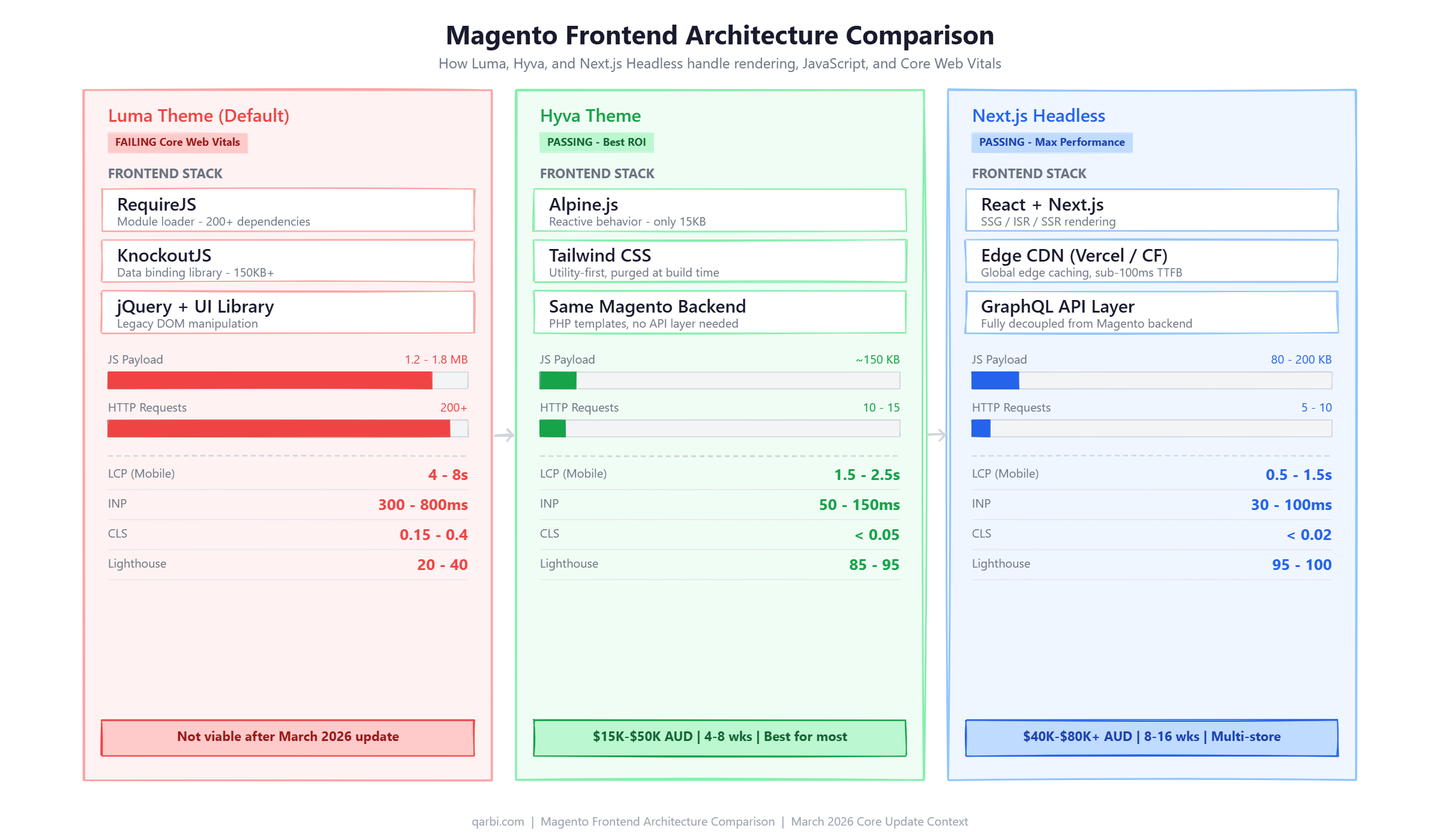
Magento stores running the default Luma theme are among the worst-performing ecommerce platforms when measured against Google's Core Web Vitals thresholds. This isn't opinion - it's measurable. Here's what the data shows for a typical mid-market Magento store on Luma:
The root cause is Luma's frontend architecture. Built on RequireJS, KnockoutJS, and jQuery, Luma loads over 200 JavaScript and CSS resources totalling 1.2-1.8MB of JavaScript alone. Each resource creates a network request, and RequireJS's dependency chain creates render-blocking waterfalls that delay the Largest Contentful Paint.
The Extension Bloat Problem
The average mid-market Magento store runs 30-50 extensions. Each extension can add its own JavaScript files, CSS stylesheets, and AJAX calls. A single poorly coded extension can add 200-500ms to page load time. Multiply that across 30+ extensions, and you understand why Magento stores struggle with performance.
Common culprits include: layered navigation extensions that load JavaScript for every filter option, review systems that make external API calls on page load, analytics and tracking pixels that block rendering, and page builder extensions that inject their own CSS frameworks on top of Luma's already bloated stylesheets.
The Layout Shift Problem
Magento's Luma theme is particularly bad at Cumulative Layout Shift (CLS). Product images load without explicit width and height dimensions, causing the page to jump as images render. Dynamic pricing blocks (tier pricing, special prices, tax calculations) inject content after initial render. Lazy-loaded product listings cause visible content shifts as users scroll. These layout shifts frustrate users and now directly hurt your Google rankings.
Why SaaS Platforms Don't Have This Problem
Shopify, BigCommerce, and other SaaS platforms handle Core Web Vitals at the infrastructure level. Their themes run on managed CDNs with automatic image optimisation, server-side rendering, and platform-level performance constraints that prevent theme developers from shipping bloated code. Magento store owners must solve this themselves - which is both the challenge and the opportunity. A well-optimised Magento store can outperform SaaS platforms, but an unoptimised one falls far behind.
Solution 1: Hyva Theme - The Fastest ROI for Core Web Vitals
Hyva theme is the single highest-ROI solution for Magento stores that need to pass Core Web Vitals after this update. It replaces Luma's entire frontend stack - RequireJS, KnockoutJS, jQuery, and the Magento UI library - with Alpine.js and Tailwind CSS. The result is an 80-90% reduction in JavaScript payload.
How Hyva Achieves These Numbers
Hyva doesn't just optimise Luma - it replaces it entirely. Instead of RequireJS's dependency chain loading hundreds of modules, Hyva uses Alpine.js for reactive behaviour (a 15KB library vs KnockoutJS's 150KB+). Instead of Magento's UI component library, Hyva uses Tailwind CSS utility classes that are purged at build time, shipping only the CSS actually used on each page.
The architecture difference is fundamental. Luma sends everything to the browser and lets JavaScript figure out what to show. Hyva sends only what's needed, with minimal JavaScript for interactive elements like dropdowns, sliders, and add-to-cart functionality. This means faster first paint, faster interactivity, and virtually zero layout shift.
Cost and Timeline
Hyva is now open source and free (previously EUR 1,000/year for the license). The implementation cost depends on store complexity:
With 4,900+ live stores using Hyva and the theme now being free and open source, the ecosystem is mature. Most popular Magento extensions either have Hyva-compatible versions or community-built alternatives. The risk profile for Hyva migration is low compared to 2-3 years ago.
Who Hyva Is For
Hyva is the right choice for most mid-market Magento stores that need to improve Core Web Vitals. Specifically, it works best for stores that: want the biggest performance jump with the least disruption to their backend, need to pass Google's CWV thresholds without a complete architecture overhaul, have a development team familiar with PHP/Magento (Hyva uses the same backend templating), and want to preserve their existing extension ecosystem as much as possible.
Bottom line: If your Magento store scores below 70 on PageSpeed Insights mobile and you need to fix it within 2 months, Hyva is the answer. It's the highest-ROI frontend upgrade available for Magento stores in 2026.
Solution 2: Next.js Headless Storefront - Maximum Performance, Maximum Flexibility
A Next.js headless storefront decouples your frontend completely from the Magento backend. Instead of Magento rendering HTML pages, a Next.js application communicates with Magento via GraphQL or REST APIs and handles all frontend rendering independently. This architecture delivers the absolute best Core Web Vitals scores possible - but at a significantly higher cost and complexity.
Why Headless Achieves Superior Performance
Next.js provides three rendering strategies that eliminate Magento's performance bottlenecks:
- Static Site Generation (SSG) - Product and category pages are pre-built at deploy time as static HTML. No server processing on each request. Pages load in under 100ms from a CDN edge node.
- Incremental Static Regeneration (ISR) - Static pages automatically rebuild in the background when data changes (new products, price updates). Visitors always get a cached page while fresh content builds behind the scenes.
- Server-Side Rendering (SSR) - For truly dynamic pages (personalised content, real-time inventory), Next.js renders on the server and streams HTML to the browser. Still significantly faster than Magento's PHP rendering.
Deployed on platforms like Vercel or Cloudflare, a Next.js storefront serves pages from edge nodes closest to your customers. An Australian shopper in Sydney hits a Sydney edge node, not a US-based origin server. This alone can reduce LCP by 1-3 seconds for Australian traffic.
Performance Numbers
Built-in Image Optimization
Next.js includes the next/image component that automatically: converts images to WebP or AVIF format, generates responsive image sizes for different screen widths, implements lazy loading with blur placeholders (preventing CLS), and serves images from the CDN edge. This eliminates one of Magento's biggest CWV problems - unoptimised product images causing layout shifts and slow LCP.
The Cost and Complexity Reality
Headless sounds ideal on paper. In practice, it comes with significant trade-offs:
For Australian businesses, the team requirement is particularly relevant. Finding developers who are proficient in both Magento backend and React/Next.js frontend is significantly harder and more expensive than finding Magento developers who can work with Hyva's Alpine.js + Tailwind stack.
Who Headless Is For
Next.js headless architecture makes sense for Magento stores that: need multiple storefronts sharing one Magento backend (e.g., B2B portal + B2C store + mobile app), require Progressive Web App (PWA) features like offline browsing and push notifications, have an existing React/Next.js development team, need to integrate with a headless CMS for content-heavy pages, or have performance requirements that exceed even Hyva's capabilities (sub-1-second LCP globally).
Honest take: For most mid-market Magento stores, headless is architectural overkill for solving a Core Web Vitals problem. Hyva gets you from a 25 to a 90 on Lighthouse. Headless gets you from 25 to 98. That extra 8 points costs 3-4x more and doubles your ongoing maintenance burden. Go headless for architectural reasons, not just performance.
Hyva vs Next.js Headless: Side-by-Side Comparison
Choosing between Hyva and headless Next.js depends on your specific situation. Here's the honest comparison across every factor that matters:
Decision Framework: Which Should You Choose?
Use this simple decision framework:
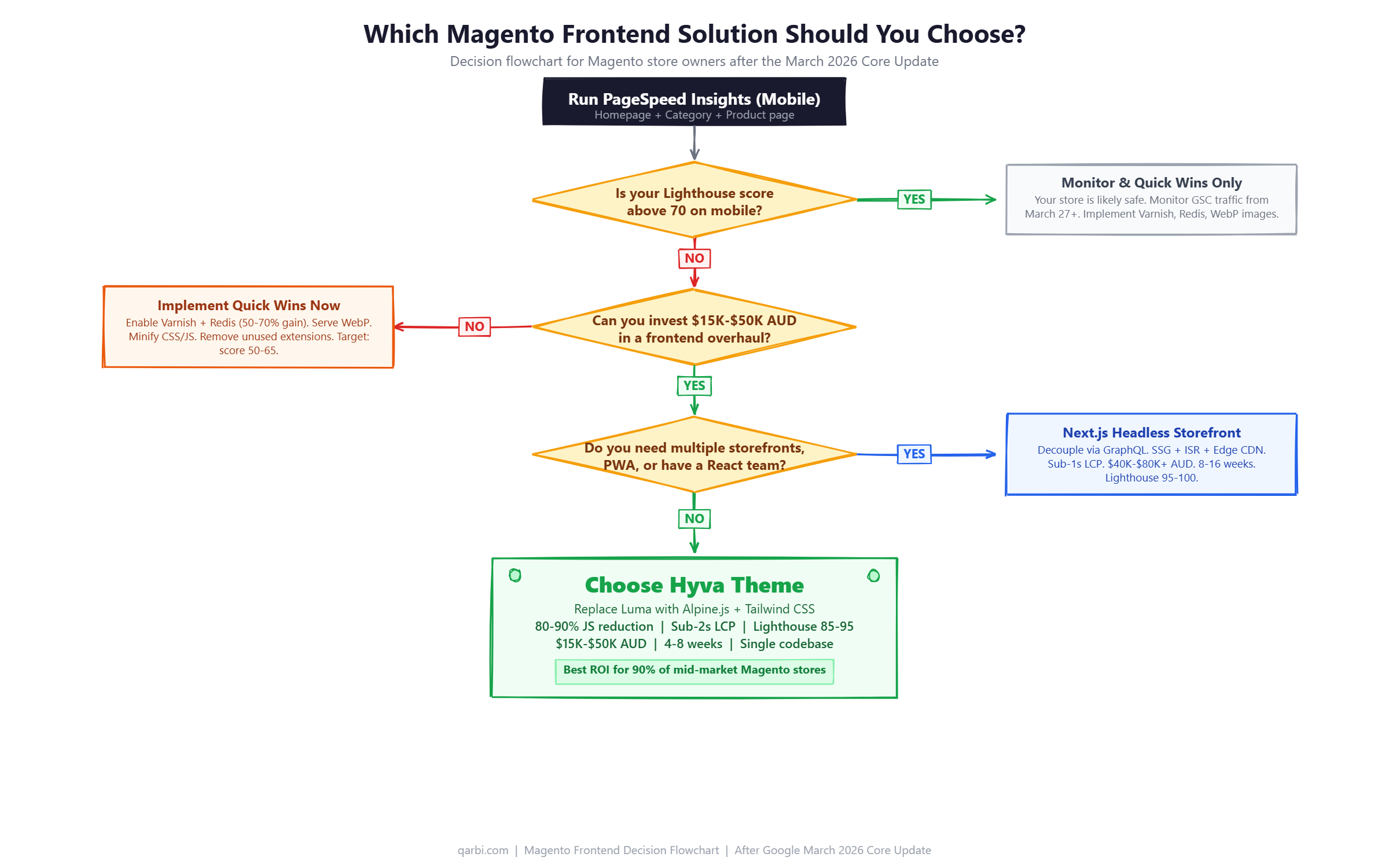
- Choose Hyva if: You need to fix Core Web Vitals fast (4-8 weeks), your budget is under $50K AUD, you run a single storefront, your team knows PHP/Magento, and you want the simplest path to passing Google's thresholds.
- Choose Next.js headless if: You need multiple storefronts on one backend, your team already uses React, you need PWA features, you have budget for $80K+ AUD implementation plus ongoing dual-codebase maintenance, and you need sub-1-second global performance.
- Choose neither right now if: Your Lighthouse score is already above 70. Focus on quick wins (Varnish, Redis, image optimisation) and monitor your rankings through this update before committing to a major frontend change.
What Magento Store Owners Should Do This Week
Whether or not you're planning a Hyva or headless migration, here's what you should do immediately to assess and mitigate the impact of the March 2026 Core Update.
Step 1: Run PageSpeed Insights on Three Pages
Test your homepage, a category page, and a product page using PageSpeed Insights in mobile mode. Record your scores. If any page scores below 70 on performance, this update is likely affecting your rankings already. Pay special attention to LCP (must be under 2.5s), INP (must be under 200ms), and CLS (must be under 0.1).
Step 2: Check Google Search Console
In Google Search Console, go to Performance and compare the period from March 27 onward against the previous 2 weeks. Look for drops in impressions (Google is showing your pages less) and clicks. If you see a decline of more than 10%, it's likely this update. Check which specific pages lost traffic - are they your slowest pages? That confirms a CWV-related impact.
Step 3: Audit Your Extension Count
Run bin/magento module:status in your Magento installation. Count the enabled third-party modules. If you have more than 30, you likely have extension bloat. Identify extensions that are unused, redundant (two extensions doing similar things), or poorly coded (check Chrome DevTools Network tab for extensions making excessive HTTP requests). Disabling 5-10 unnecessary extensions can improve load time by 500ms-2 seconds.
Step 4: Implement Quick Wins (No Theme Change Required)
These optimisations work on any Magento theme and can be implemented in days, not weeks:
- Enable Varnish Full-Page Cache - Serves cached pages in under 100ms vs 2-4 seconds uncached. This is the single most impactful quick win.
- Configure Redis for session and cache storage - Eliminates filesystem I/O bottlenecks.
- Enable WebP image serving - Reduces image sizes by 25-50% versus JPEG/PNG. Use Magento's built-in image optimisation or an extension like TinyPNG.
- Implement lazy loading for below-the-fold images - Reduces initial page weight and improves LCP.
- Minify and merge CSS/JS - Enable in Stores > Configuration > Developer. Reduces HTTP requests.
- Add explicit image dimensions - Set width and height on all product images in your templates to prevent CLS.
Step 5: Evaluate Hyva or Headless Migration
If your Lighthouse score is below 50 after implementing quick wins, it's time for a frontend overhaul. Quick wins can improve a 30 to a 50-60, but getting to 85+ almost always requires either Hyva or headless. Read our Complete Guide to Hyva Theme for a detailed breakdown of what's involved.
Not sure which approach fits your store? Book a free performance audit with our team. We'll run a detailed analysis of your store's Core Web Vitals, identify the quickest wins, and recommend whether Hyva or headless is the right path for your specific situation.
The Other Half: Content Quality and Information Gain
Speed alone won't save your rankings. The March 2026 update equally prioritises content quality through two new mechanisms: Information Gain scoring and AI content detection.
What Information Gain Means for Ecommerce
Information Gain measures whether your page adds value beyond what's already available in search results. For Magento stores, this applies to:
- Product descriptions - Manufacturer copy that appears on 50 other retailer sites has zero information gain. Write original descriptions based on your actual experience with the product. Include details competitors don't mention.
- Category pages - A category page with just a product grid and a keyword-stuffed paragraph at the top provides no information gain. Add genuine buying guides, comparison tables, or selection criteria that help shoppers make decisions.
- Blog content - Posts that reword what already ranks on page 1 are now being actively demoted. Contribute original data, real benchmarks, case studies, or expert analysis that doesn't exist elsewhere.
- FAQ sections - Generic FAQs copied from competitors don't help. Write answers based on actual customer questions your support team receives.
AI Content and the Gemini 4.0 Filter
The Gemini 4.0 Semantic Filter appears to evaluate content on a spectrum, not a binary AI/human classification. Content that shows clear signs of mass AI generation - formulaic structure, generic language, no specific expertise signals - is being demoted. Content that uses AI as an editing or drafting tool but includes genuine human insight, specific data, and editorial voice is performing well.
For Magento stores with large catalogs, this is particularly relevant. If you've AI-generated thousands of product descriptions, review them for: brand-specific voice, unique product details only someone who's handled the product would know, and specific use-case recommendations. The descriptions don't need to be 100% human-written, but they need to be 100% human-validated and enhanced.
The Bigger Picture: Why This Pattern Keeps Repeating
This isn't the first time Google has rewarded speed, quality, and authenticity. It's the same pattern from every major core update: the sites that win are the ones that were already built right. Fast architecture. Clean code. Original content. Strong expertise signals.
The sites that lose are the ones built around workarounds that get weaker with every update. Plugin dependency chains that add seconds to load times. Recycled content that adds nothing new. AI-generated pages that were never reviewed by a human with domain expertise.
For Magento store owners, this update is a clear signal: the cost of not addressing frontend performance is increasing with every core update. Luma was already a liability. After this update, it's an active ranking penalty. Whether you choose Hyva ($15K-$50K AUD, 4-8 weeks) or headless Next.js ($40K-$80K+ AUD, 8-16 weeks), the investment pays for itself in recovered rankings, improved conversions, and protection against future updates that will only increase the weight of performance signals.
The question isn't whether to fix your Magento store's performance. It's how fast you can do it. Every week your store runs on an unoptimised Luma theme after this update is a week of lost rankings, lost traffic, and lost revenue.
Frequently Asked Questions
Frequently Asked Questions
How long until the March 2026 Core Update finishes rolling out?
Google began rolling out the March 2026 Core Update on March 27, 2026. Based on the announced timeline, expect full rollout completion by mid-April 2026 (approximately 2 weeks). SEMrush recorded a volatility score of 9.5/10, among the highest ever recorded for a core update.
Will my Magento store rankings recover if I improve Core Web Vitals?
Yes, but recovery timing varies. Core Web Vitals improvements take effect as Google recrawls your pages (days to weeks). However, major ranking recovery often happens at the next core update. Stores that implemented Hyva theme typically see Lighthouse scores jump from 20-40 to 85-95 within the first week after deployment.
Does Hyva theme affect my Magento admin panel or backend?
No. Hyva only replaces the customer-facing frontend (the storefront). Your Magento admin panel, extensions, backend logic, API integrations, and all server-side functionality remain completely unchanged. Hyva is deployed as a theme switch, typically tested on a staging environment first.
Is a Next.js headless storefront overkill for a single Magento store?
Usually yes. Headless architecture (Next.js + Magento via GraphQL) costs $40K-$80K+ AUD versus $15K-$50K for Hyva, takes 8-16 weeks instead of 4-8, and requires maintaining two separate codebases. Hyva delivers comparable Core Web Vitals scores (85-95 vs 95-100) at a fraction of the cost. Go headless only if you need multiple storefronts, a PWA, or your development team requires React/Next.js.
What should I do right now if my Magento store traffic dropped after March 27?
First, run PageSpeed Insights on your homepage, a category page, and a product page (mobile mode). If any score is below 70, performance is likely the cause. Second, check Google Search Console - compare impressions and clicks from March 27 onward against the previous 2 weeks. Third, audit your extension count - each extension adds JavaScript and CSS. Quick wins include enabling Varnish FPC, configuring Redis cache, and serving WebP images.
Ready to fix your store?
Book a free 30-minute audit. We'll review your setup and tell you exactly what we'd do differently.
Book a Free Audit